Forum Discussion

Per_Damsgaard
Apr 10, 2021Brass Contributor
Link to recording from Live Event is missing
Hi all, I am used to utilize the Live Event functionality in Teams. After the event I'm downloading the recording. Yesterday I did as I'm used to, but suddenly the "download bottom" is not co...
 May 06, 2021
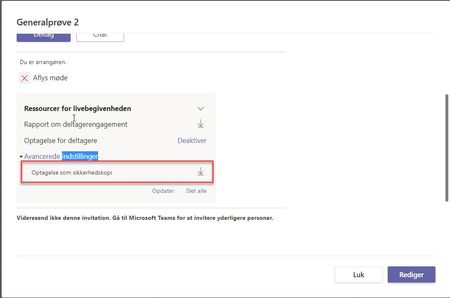
PiatnaI do not know where the update (to read it) is, but I do know that I tested this out again yesterday. When I go to my Teams calendar, I used to click on the two arrows to maximize the event and then the download details would appear on the left. Now, when I see the invite, I have to double click on it, and then the download information appears. Its such a tiny thing but that's what made them appear for me.

Per_Damsgaard
Apr 12, 2021Brass Contributor
Just talked to MS Support. They are working on a fix right now. Should be fixed within 24 hours the MS supporter told me. He promised to help me to get the recording downloaded in case a the download button should be missing. But he expected it to appear 🙂
/Per
/Per
 Anna_LevinaApr 14, 2021Copper ContributorHi!
Did they help you to find the video? I have the same issue. We also had live event on April, 9. PiatnaApr 14, 2021Copper ContributorHi, no body answers to me. Is some one know how i can write directly to Teams' Support? I cant find it Support Page.
Now, for other days recordings are working, but for past 9 April isn't appear(- Per_DamsgaardApr 14, 2021Brass ContributorYou need to be an administrator to do that. In Office 365 administration there is a button for support. It didn't worked for me so I googled a phone no. And there created the ticket for me.
- rakesh610Apr 12, 2021Copper Contributorany insights shared...what appears to be the issue? hope its resolved asap
- Per_DamsgaardApr 12, 2021Brass Contributor...It's just an error on MS's side. I don't know specifics.