Forum Discussion

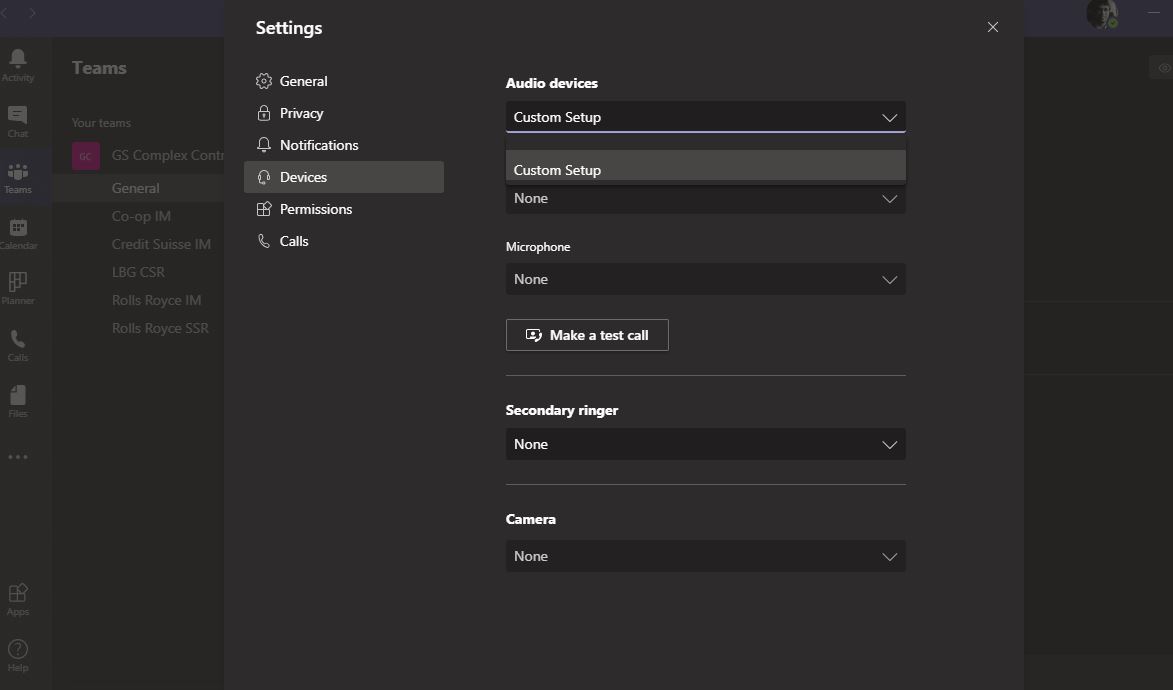
Issues with Teams - Unable to Call and the Audio Device details don't get picked up

- Jul 20, 2020
Pavan8785 : Did you checked your computer memory ,disk space and default Audio settings . Is your sound settings is properly configured in windows ?
Please find attached screenshot for quick check.


Pavan8785 : Did you checked your computer memory ,disk space and default Audio settings . Is your sound settings is properly configured in windows ?
Please find attached screenshot for quick check.
 Pavan8785Jul 20, 2020Copper Contributor
Thanks Sanjiv for responding.
Apologies, I couldn't respond yesterday. My Teams is running but I cant see the app in the Device details list. Please see attached.
I use an 8GB RAM laptop and my C drive has 107GB more.
I am still facing the same issue.
Any help will be appreciated.
- Sanjiv_kumarJul 21, 2020Brass Contributor
Hi Pavan8785 ,
Seems your windows 10 update is still pending , You have to check the update.
Steps is as below.
- Select Start > Settings > Update & Security > Windows Update > Check for updates.
- Do one of the following:
- If the status says "You're up to date, go to the next tip.
- If the status says "Updates are available," select Install now.
- Select the updates you want to install, then select Install.
- Restart your PC and see if your sound is working properly
Once done with the update , reset the app volume and device preferences. Screenshot attached.
- Pavan8785Jul 21, 2020Copper Contributor
Sanjiv_kumar Thanks Sanjiv. I did as suggested. My windows seem to be upto date. Please see attached. I have restarted but no luck! Thanks for your pateince.


