Forum Discussion

ardamis
Oct 06, 2023Copper Contributor
"Issue occurred while checking for updates." new Teams cannot update...
Currently running the new Teams client version 23247.1112.2396.409 in a corporate environment with CIS benchmarks configured via GPO, SSL packet inspection and content filtering, etc... So, lots of o...
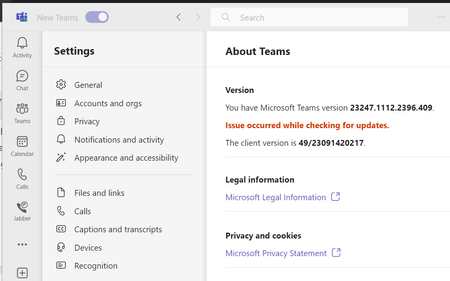

ericappelboom
Dec 13, 2023Copper Contributor
Bing-Gao Yes, This error will occur if Delivery Optimisation is disabled in GPO evidenced by RKEY Computer\HKEY_LOCAL_MACHINE\SOFTWARE\Policies\Microsoft\Windows\DeliveryOptimization\DODownloadMode = 100
Set it to 0 and Teams2.x will autoupdate
The old value has been deprecated https://learn.microsoft.com/en-us/windows/deployment/do/waas-delivery-optimization-reference#download-mode

h892gu
Dec 14, 2023Copper Contributor
 Kristaps_EsterlinsDec 28, 2023Copper ContributorHi,
Stumbled upon the same issue. Thanks to ericappelboom the issue was resolved. The value for DODownloadMode in our case (Windows 10 Pro x64 22H2) was set to 99 and I was able to update the new MS Teams client. vladimirgagulaJan 30, 2024Copper ContributorWe have exactly the same error pattern in my organisation. In our organisation, the "DODownloadMode" is also set to "100" and this prevents the new Teams from updating.
However, this setting is essential for our Configuration Manager infrastructure.
Is there another alternative to make the new Teams updates possible?- Kristaps_EsterlinsJan 30, 2024Copper ContributorHi,
>However, this setting is essential for our Configuration Manager infrastructure.
See the Microsoft Documentation here - https://learn.microsoft.com/en-us/windows/deployment/do/waas-delivery-optimization-reference#download-mode
Starting in Windows 11, this option is deprecated. Don't set Download mode to '100' (Bypass), which can cause some content to fail to download. If you want to disable peer-to-peer functionality, set DownloadMode to (0). If your device doesn't have internet access, set Download Mode to (99). When you set Bypass (100), the download bypasses Delivery Optimization and uses BITS instead. You don't need to set this option if you're using Configuration Manager.