Forum Discussion

johnjohn-Peter
Oct 14, 2024Steel Contributor
How i can hide a Channel for all users who have access to the Teams using their Desktop App?
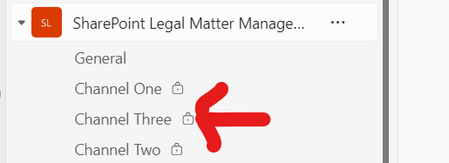
I am an Owner of a Teams, and the Teams has those channels:- Now i want to totally hide "Chanel Three" from all users Teams' desktop app? how i can do so? Thanks

jaymaradiaga
Oct 14, 2024Iron Contributor
Hello johnjohn-Peter,
You should be able to resolve the issue by selecting the three dots on the right side of each channel and clicking "Hide."
Please let me know if this helps or if you need further assistance.
Best regards,
JM
You should be able to resolve the issue by selecting the three dots on the right side of each channel and clicking "Hide."
Please let me know if this helps or if you need further assistance.
Best regards,
JM
 johnjohn-PeterOct 15, 2024Steel Contributor
Thanks, i did this using a Teams owner, it hide it for the owner, but still shows inside other users's list... i want to hide it for all users.
Thanks
 Joshua-NDec 02, 2024Copper Contributor
Have you considered using a private channel for this instead?