Forum Discussion

tomwrigglesworth
Mar 12, 2025Tin Contributor
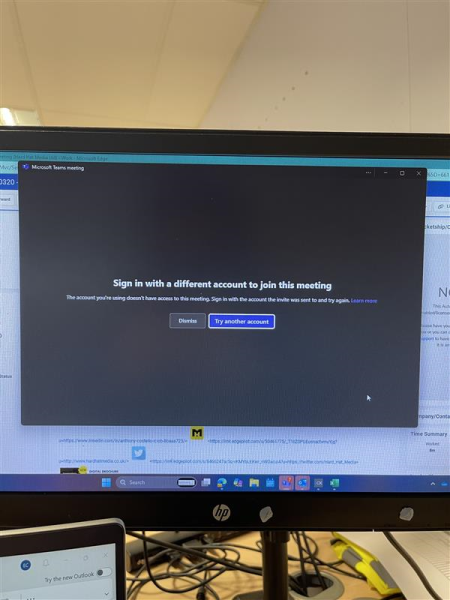
External users not able to join
Hello, We are having a problem when an external user is trying to join a meeting, using a URL from someone else's invite. Is there a way to bypass this problem or allow people to join me...

Mar 18, 2025
Yes, this issue occurs because Microsoft Teams enforces meeting authentication policies, which can sometimes prevent external users from joining meetings via forwarded invites. Here are a few potential solutions:
Solution 1: Adjust Meeting Options
Before the Meeting:
- The meeting organizer can go to the Meeting options in Teams (via the calendar event in Outlook or Teams).
- Set Who can bypass the lobby? to Everyone (or "People in my organization and guests" if some control is still needed).
- Ensure "Require authentication to join" is turned off (if strict authentication is not required).
During the Meeting:
- The organizer or a participant with presenter rights can manually admit external users from the lobby.
Solution 2: Ensure External Users Use the Correct
Authentication Method
- If external users are blocked with the error "Sign in with a different account", they may be trying to join with the wrong Microsoft account.
- Ask them to sign out from their current Microsoft 365 account and rejoin using the correct credentials.
Steps for External Users:
- Open an incognito/private browsing window.
- Copy and paste the Teams meeting URL.
- Sign in with the correct Microsoft account.
Solution 3: Enable Guest Access in Teams (if not already enabled)
- In Microsoft Teams Admin Center, ensure guest access is allowed:
- Go to Teams Admin Center → Org-wide settings → Guest access.
- Turn on Allow guest access in Teams.
- Under Meetings → Meeting policies, check if external users are allowed to join meetings.
Solution 4: Verify Azure AD Conditional Access Policies
- If your organization enforces strict Conditional Access policies, external users might be blocked.
- Check Azure AD settings and allow Teams meeting access for guests while maintaining security.