Forum Discussion

jameshoty
Jun 24, 2020Brass Contributor
Confusing Notification
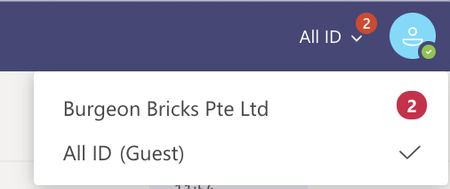
Hi I keep getting (2) on the top right corner but when I click on it and search through all my teams and chats, there is no new messages I can find. Very confusing. Is there something wrong with ...
 Jun 25, 2020
jameshoty Hey James, thanks for the feedback! Sound promising at least. The location for Mac is
~/Library/Application Support/Microsoft/Teams

Jun 24, 2020
This has been a known issue for a while, the numbers you see are related to other tenants you have access to and they are supposed to reflect activity you are missing on those tenants

jameshoty
Jun 24, 2020Brass Contributor
- ThereseSolimenoJun 25, 2020Former Employee
Hi jameshoty A tenant refers to a unique organization. Think of a company or school as a tenant and within that there are several Teams, within the Teams there are channels, etc. Does that help?
- ThereseSolimenoJun 25, 2020Former Employee
Hello jameshoty jcgonzalezmartin
Hmm, are you saying this is a known Mac issue? Because when I click on either icon at the top of the community page (I'm using Windows 10), I can see all of my posts or private responses and I have the option of deleting them, thus getting rid of the numbers if I choose.
