Forum Discussion

spottedmahn
Aug 28, 2020Iron Contributor
Can't create hyperlink in meeting pop-out chat window
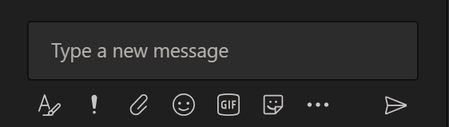
In the chat window of the new pop-out meeting window, I can't create hyperlinks. CTRL + K doesn't work & the hyperlink icon is missing.
- Aug 31, 2020
Hi Jody Finch 👋
>Before you can use Ctrl + K you must click the "A" with the brush icon.
That's the problem there! I've never had to do that before. It doesn't behave that way in the channels. It doesn't behave that way in chat. And I'm 97% confident it didn't behave that way before the new pop-out meeting feature.


Jody Finch
Aug 28, 2020Brass Contributor
It's working for me? Before you can use Ctrl + K you must click the "A" with brush icon.
Full steps are:
1. Click the "A" (with brush)
2. Click *hyperlink button (or Ctrl+K)
3. Enter URL info.
*Depending on the size of your window you may have to click the '...' and then the hyperlink button (or just drag the window to be bigger).