Forum Discussion

johnjohn-Peter
Mar 01, 2024Steel Contributor
As a Team Owner, can i hide standard channels for all users
Inside the Teams UI, i can hide a channel as follow;- this will show the channel inside the "hidden channels" list. At first i thought this will also hide it for all the Teams memb...
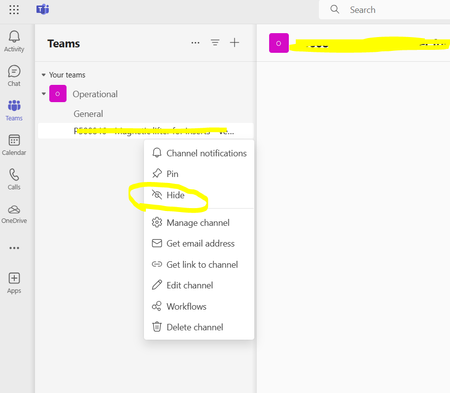

Mar 01, 2024
You cannot hide channels for other people. Only your own and only through the client.
The option to "Show for others" is in the channel settings for a team. Where you can enable up to 10 channels to automatically be shown for anyone that joins the team.
The option to "Show for others" is in the channel settings for a team. Where you can enable up to 10 channels to automatically be shown for anyone that joins the team.

johnjohn-Peter
Mar 01, 2024Steel Contributor
ChrisWebbTech You mean i can only create 10 channels for a Microsoft Teams ? other channels i create will not get shown inside the other users Teams? or i did not get your reply?
- Mar 01, 2024
- johnjohn-PeterMar 01, 2024Steel Contributor
ChrisWebbTech i did not get what is meant exactly, as based on my test as a channel admin i created 15 channels and they appeared to all members so not sure what does 10 refer to ?
- Mar 01, 2024Whenever you get to a certain number of channels they start going under the hidden channel list. The auto show promotes certain channels that you want to guarantee show up in the list to people in your Team unless they hide it themselves. You can set up to 10 channels to do this. Unless they have changed the way it works in the new client for some reason that is how it used to work.