Forum Discussion

Denis_Molodtsov_-_TD
May 12, 2021Copper Contributor
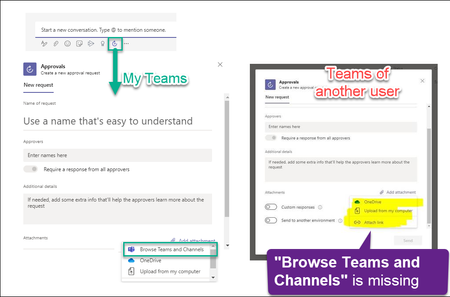
Approvals App - "Browse Teams and Channels" option is missing
Does anyone know how to control the "Browse Teams and Channels" option inside the "Approvals" Teams App? It shows for myself and does not show up for some of my colleagues. They are now asking how to...

Denis_Molodtsov_-_TD
May 13, 2021Copper Contributor
Hi jaymaradiaga, how can I tell the version of my teams? It does not looks like it is easy or even possible. Have you seen this discussion? https://techcommunity.microsoft.com/t5/microsoft-teams/how-do-you-know-you-have-the-latest-teams-desktop-version/m-p/2046845

OzOscroft
Jul 14, 2022Iron Contributor
Hi Denis. I know this is an old thread, but I wondered if you fathomed this out.
For the Teams version you can click the 3 dots toward the right of the purple-bar across the top of Teams and then select About > Version.
With regards seeing the "Browse Teams and Channels" option, if you do this from within a conversation in a Teams channel you should see the option, but if you do it from the Approvals app directly or a conversation in Chat, you won't see it (which makes sense). Was the other user definitely in a channel?
Hope this helps.
For the Teams version you can click the 3 dots toward the right of the purple-bar across the top of Teams and then select About > Version.
With regards seeing the "Browse Teams and Channels" option, if you do this from within a conversation in a Teams channel you should see the option, but if you do it from the Approvals app directly or a conversation in Chat, you won't see it (which makes sense). Was the other user definitely in a channel?
Hope this helps.