Forum Discussion

Converting sharepoint items into readable format to send email?
- Feb 19, 2021
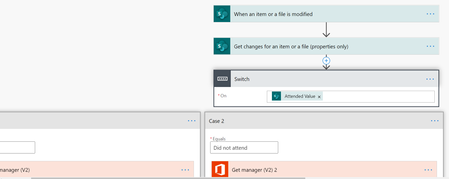
Charles665 I assume you are using a Choice column for the Attended/Did Not Attend in your SharePoint list. That's what I've added to my list and the Course column is also a Choice column.
My flow is simpler than yours in that you don't need a Switch as there are only 2 outcomes for the attended column, Attended or Did Not Attend, so you can use a Condition. Also, you only need 1 Get Manager (V2) which you can use earlier in the flow. And you only need 1 Send an email action. So the flow looks like this:
Next we add 2 Office 365 User actions to get the profile of the user and their manager:
Next we add a Compose control and select Attended Value as the input. We then have a condition to check if the Attended column has been changed
If it hasn't then take no action, but if it has then send an email. It's the same email whether the user attended the training or not but uses the outputs of the Attended Compose control to add either Attended or Did Not Attend.
The email result looks like this:
Rob
Los Gallardos
Microsoft Power Automate Community Super User

Charles665 I assume you are using a Choice column for the Attended/Did Not Attend in your SharePoint list. That's what I've added to my list and the Course column is also a Choice column.
My flow is simpler than yours in that you don't need a Switch as there are only 2 outcomes for the attended column, Attended or Did Not Attend, so you can use a Condition. Also, you only need 1 Get Manager (V2) which you can use earlier in the flow. And you only need 1 Send an email action. So the flow looks like this:
Next we add 2 Office 365 User actions to get the profile of the user and their manager:
Next we add a Compose control and select Attended Value as the input. We then have a condition to check if the Attended column has been changed
If it hasn't then take no action, but if it has then send an email. It's the same email whether the user attended the training or not but uses the outputs of the Attended Compose control to add either Attended or Did Not Attend.
The email result looks like this:
Rob
Los Gallardos
Microsoft Power Automate Community Super User

Thank you RobElliott. This worked perfectly. Appreciate you taking time to help me with this!!
- RobElliottFeb 19, 2021Silver Contributor
Charles665 no problem, glad you got it to work.
Rob
Los Gallardos
Microsoft Power Automate Community Super User