Forum Discussion

Combine Multiple MS Forms into one SharePoint List via Flow
- May 09, 2021
abbeymiles In option 1 it's not a link to a form it's a link to the specific item in the list for them to edit it with their info. In the email action you select the </> code view icon then add the following html code and select Link to item from the dynamic content:
Rob
Los Gallardos
Microsoft Power Automate Community Super User

Obayd_LD it will link to the item in the list that was originally populated by the data in the form.
Rob
Los Gallardos
Microsoft Power Automate Community Super User

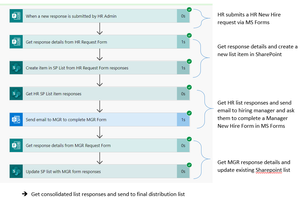
RobElliottI am also struggling with this issue and cannot get the data from the second form to fill in the MS List on teh same row. I have clearly set up somethign wrong but cannot work it out. Here is my flow, if you are able to provide some guidance please. Thanks in advance