Forum Discussion

GullettBrian
Jan 23, 2025Iron Contributor
Change Default for Copilot Automatic Room Rebooking Setting in Outlook?
My users with Microsoft 365 Copilot licenses have noticed a newer feature that automatically rebooks meetings with an alternate room if the selected room is unavailable. It appears that this setting ...
 Sep 15, 2025
I would like to share the response i received from Microsoft support, since i can imagine more people will land here while desperately searching for a solution.
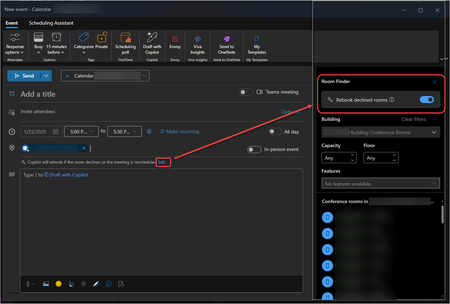
Microsoft 365 Copilot’s automatic room rebooking - moving meetings to alternate rooms when the original is unavailable - is on by default and cannot be disabled globally.- Default Behavior: Enabled for Copilot users, it automatically rebooks declined rooms for single and recurring meetings.
- User Control Only: Users can turn it off per meeting in Outlook. No global admin setting exists.
- Microsoft Places: Part of Microsoft Places, it helps manage room conflicts automatically.
- Admin Feedback: Many admins have requested a global option, but as of March 2025, Microsoft has not provided one.
What You Can Do:
- Educate Users: Show them how to disable rebooking when needed.

somaken
Feb 02, 2026Copper Contributor
Hello,
To everyone struggling with this issue : we can mitigate it by creating a building and put all your rooms you don't want Copilot search for.
When you're booking a room, Copilot will search to any room available in the building of the room you selected. If you put some rooms in another building, Copilot will not search them.