Forum Discussion

Change Default for Copilot Automatic Room Rebooking Setting in Outlook?
 Sep 15, 2025
I would like to share the response i received from Microsoft support, since i can imagine more people will land here while desperately searching for a solution.
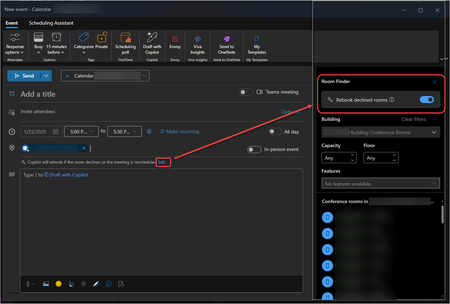
Microsoft 365 Copilot’s automatic room rebooking - moving meetings to alternate rooms when the original is unavailable - is on by default and cannot be disabled globally.- Default Behavior: Enabled for Copilot users, it automatically rebooks declined rooms for single and recurring meetings.
- User Control Only: Users can turn it off per meeting in Outlook. No global admin setting exists.
- Microsoft Places: Part of Microsoft Places, it helps manage room conflicts automatically.
- Admin Feedback: Many admins have requested a global option, but as of March 2025, Microsoft has not provided one.
What You Can Do:
- Educate Users: Show them how to disable rebooking when needed.

Hi everyone,
we are also affected by the automatic room rebooking feature with Microsoft 365 Copilot.
Our scenario:
- A meeting is booked in one of our meeting rooms about one week in advance.
- The room mailbox accepts the invitation.
- One day before the meeting, Copilot rebooks the meeting to a different meeting room because it thinks the capacity of the other room is a better match for the number of attendees.
For our organization this is not acceptable – once a meeting room has accepted the booking, we do not want Copilot to move the meeting elsewhere.
I have read in this thread that, as of March 2025, automatic room rebooking is enabled by default and there is no global admin setting to change this behavior.
My questions:
- Has anything changed since then – is there now any way for an admin to disable automatic room rebooking tenant-wide for Outlook on Windows, Mac and the web?
- If not, is there at least a way to disable this feature specifically for Outlook for Mac?
- Apart from removing Copilot licenses / disabling Copilot in Outlook, is there any supported way to keep Copilot but turn off only the room rebooking feature?
Any updated guidance from Microsoft or other admins would be very welcome.
Thanks in advance.