Forum Discussion

andrew1137
Jul 24, 2025Copper Contributor
Adaptive Card: Input Toggle default value not working in Agent Chat
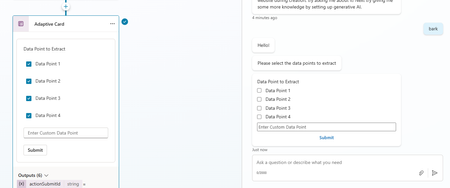
Hello! I am building a custom Copilot agent that analyzes documents for specific data points. Goal Have an Adaptive Card display the list of pre-defined data points and allow the user to ...

ChrisL10
Jul 28, 2025Brass Contributor
Hi Andrew,
If you publish the agent to Teams / Microsoft 365, you should see the options are checked there, I just tested it myself. They just appear unchecked in Copilot Studio for some reason.
I was however getting an InvalidPropertyPath error with your JSON, which Copilot updated it to the below so it would work:
{
    "type": "AdaptiveCard",
    "$schema": "https://adaptivecards.io/schemas/adaptive-card.json",
    "version": "1.5",
    "body": [
        {
            "type": "TextBlock",
            "text": "Data Point to Extract",
            "wrap": true
        },
        {
            "type": "ColumnSet",
            "columns": [
                {
                    "type": "Column",
                    "width": "stretch",
                    "items": [
                        {
                            "type": "Input.Toggle",
                            "title": "Data Point 1",
                            "value": "true",
                            "id": "dataPoint1"
                        },
                        {
                            "type": "Input.Toggle",
                            "title": "Data Point 2",
                            "value": "true",
                            "id": "dataPoint2"
                        },
                        {
                            "type": "Input.Toggle",
                            "title": "Data Point 3",
                            "value": "true",
                            "id": "dataPoint3"
                        },
                        {
                            "type": "Input.Toggle",
                            "title": "Data Point 4",
                            "value": "true",
                            "id": "lenderResp"
                        },
                        {
                            "type": "Input.Text",
                            "placeholder": "Enter Custom Data Point",
                            "id": "customText"
                        }
                    ]
                }
            ]
        },
        {
            "type": "ActionSet",
            "actions": [
                {
                    "type": "Action.Submit",
                    "title": "Submit"
                }
            ]
        }
    ]
}
Key Fixes:
- Changed id values like "Data Point 1" to "dataPoint1" (no spaces).
- Removed the id from the Action.Submit button — it's not needed and can cause issues.