Forum Discussion

Windows Autopilot for pre-provisioned deployment
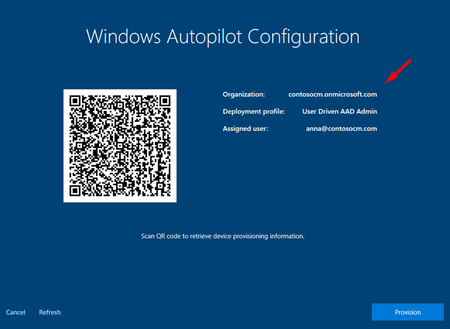

Hi Rudy_Ooms_MVP You're helpful as always, sadly to say the Intune printer setup until I left the last client I didn't manage to archive. But, I'll keep it for next time then try again. 😉
Yes, the above question is about OOBE deployment, what I've been archived was the first time un-box a brand new laptop then powering on and thru command prompt connect to the tenant and upload the device info such as Hardware hash, Microsoft product ID and S/N. So, the device will be inside the Autopilot group, then await user sign in the device. Once the user signs in the device will be seen as below attached.
My manager was asked me if it possible when assisting the overseas user with a brand new laptop whether can without involving the user go thru the command prompt process just only need to press the Windows key five times then click the provision button setup automatically by Autopilot?
So, I told my manager we can go back to the Intune manager > Group > Autopilot group > Change the group type from Dynamic to Assign > When a device onboarding the user only need to sign in the user Email account after choosing the region, keyboard layout, connect Wi-Fi, turn off all the privacy options. Then once logging the device, I will add the new device to the Autopilot group.
Do you know any other best way to do enroll devices when assisting overseas users?
Thank you. 😃

Just wondering but what happens when you skip the user status page ?
As it looks like the same issue I am describing here..
https://call4cloud.nl/2021/06/those-magnificent-drivers-in-their-flying-microsoft-store-or-how-i-flew-from-the-enrolment-status-page-to-paris-in-25-hours-11-minutes/
- Sk-73Dec 02, 2021Iron Contributor
Thank you for your reply.
I think there's no way can skip the user sign in if the provision is done.