Forum Discussion

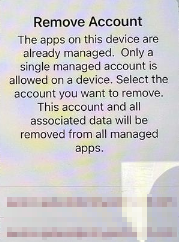
Intune App Protection Policies (The apps on this device are already managed)
- Oct 12, 2022Sorry for my delayed response; I was waiting to hear back. I have no actual technical details about the resolution, and it was confirmed it was an InTune issue that's been resolved. The Teams and Outlook apps should now start working. I told them to send me the technical details, even if I didn't understand it and they didn't.

It was mentioned that this should be fixed, but who is saying that? Is Microsoft saying they have resolved the issue? I have read most of the posts and I believe I have a variation on what most people are seeing, but I don't think it has any real bearing on the problem. My iPhone 12 Pro "broke" and was replaced via Apple Care. I am running iOS 16. It appears most people affected have new iPhone 14's. As others have mentioned, this doesn't impact my access on my iPad. But the new iPadOS isn't out yet.
I went to the App Library and did a search for "Microsoft". This produced a list of all the 365 apps on my iPhone. I verified that every app is logged out of my work account. I am logged into my personal 365 account on several apps (Word, Excel, and OneDrive). Authenticator adds my work account when I try to login. The other apps have no accounts defined as I only use them for work. I still get the error if I attempt to add my work account to any 365 app. I don't have Edge installed.
