Forum Discussion

DrBojlerGyula
Dec 14, 2021Tin Contributor
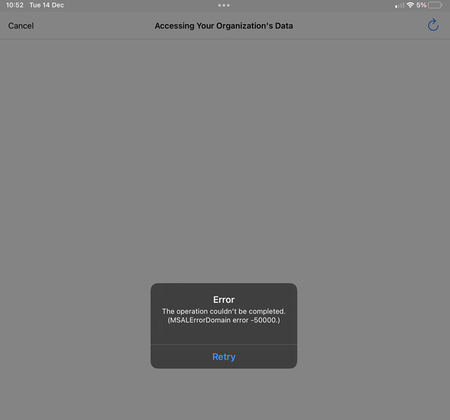
App Protection iOS & Android - the operation couldn't be completed (MSALErrorDomain error -50000)
Hi All! I have a strange behavior. The current setup is: We are using iOS and Android devices with conditional access policies and application protection policies. The conditional access pol...

Dec 15, 2021
WHen trying to connect, could you share the sign in event from the sign in log? so we can rule out any existing ca's blocking the login.
What happens when you exclude 1 user (to test with) from this app protection policy? (delete the app first to be sure no app protection policy is already applied to it)
What happens when you exclude 1 user (to test with) from this app protection policy? (delete the app first to be sure no app protection policy is already applied to it)

DrBojlerGyula
Dec 16, 2021Tin Contributor
Sing in event log: everything normal, State=success, no other conditional access is blocking, also double checked via "what if" tool.
The behavior for the excluded user is normal: there is no message and the user can use teams.
The behavior for the excluded user is normal: there is no message and the user can use teams.
 baseer700May 26, 2022Copper Contributor
cmessina85 remove the account from device and re-add
 cmessina85Mar 23, 2022Tin ContributorI am seeing the same issue and trying to troubleshoot. If anyone has a solution please advise.
- Dec 16, 2021Mmm... I guess its becoming hard indeed to troubleshoot further as I don't have access to the ms infra 😛 ... If you get response from them... please share 🙂
- DrBojlerGyulaDec 16, 2021Tin ContributorThanks once again your reply. 🙂
We have only configured the app protection policies for the services we use. 🙂 (App Protection Scope are now all MS Apps, excluding Outlook and Edge) .
A second step will be, to force the ca policy to use app protection. For now, every access for MS Teams is under app protection via the app protection policies.
I just created a user with an exchange online mailbox and the behaviour is the same. I think it is time to open a Microsoft case. - Dec 16, 2021Unfortunately we the migration to Exchange Online --> I guess that part didn't arrived at my brains
"You can create mobile app management policies for Office mobile apps that connect to Microsoft 365 services. You can also protect access to Exchange on-premises mailboxes by creating Intune app protection policies for Outlook for iOS/iPadOS and Android enabled with hybrid Modern Authentication. Before using this feature, make sure you meet the Outlook for iOS/iPadOS and Android requirements. App protection policies are not supported for other apps that connect to on-premises Exchange or SharePoint services. "
Couldnt it be that because teams makes use of exchange... that that's the reason app protection policies arent going to work for teams (yet)
https://docs.microsoft.com/en-us/mem/intune/apps/app-protection-policy
https://docs.microsoft.com/en-us/microsoftteams/exchange-teams-interact - Dec 16, 2021You posted the ca rule for requiring mfa... no ca rule to enforce app protection or approved apps?