Forum Discussion

DrBojlerGyula
Dec 14, 2021Copper Contributor
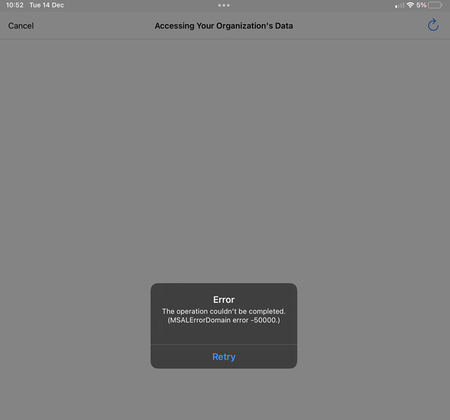
App Protection iOS & Android - the operation couldn't be completed (MSALErrorDomain error -50000)
Hi All! I have a strange behavior. The current setup is: We are using iOS and Android devices with conditional access policies and application protection policies. The conditional access pol...

DrBojlerGyula
Dec 15, 2021Copper Contributor
Sure, they do have MFA. 🙂
The app protection policy is this: (the new one, the older one had a pin length of 4 digits and enabled third party keyboards.
Apps
Target to apps on all device types
No
Device types
Unmanaged
Public apps
Microsoft Invoicing
Microsoft Kaizala
Microsoft Power Apps
Microsoft Edge
Microsoft 365 Admin
Microsoft Excel
Microsoft Outlook
Microsoft PowerPoint
Microsoft Word
Microsoft Bookings
Microsoft Office
Microsoft OneNote
Microsoft Planner
Microsoft Power BI
Microsoft SharePoint
Microsoft StaffHub
Microsoft OneDrive
Microsoft Teams
Microsoft Lists
Microsoft Stream
Microsoft To-Do
Microsoft Visio Viewer
Microsoft Whiteboard
Custom apps
--
Data protection
Prevent backups
Block
Send org data to other apps
Policy managed apps
Save copies of org data
Block
Allow user to save copies to selected services
OneDrive for Business
SharePoint
Transfer telecommunication data to
Any dialer app
Dialer App URL Scheme
--
Receive data from other apps
All Apps
Open data into Org documents
Allow
Allow users to open data from selected services
OneDrive for Business
SharePoint
Camera
Restrict cut, copy, and paste between other apps
Any app
Cut and copy character limit for any app
0
Third party keyboards
Block
Encrypt org data
Require
Sync policy managed app data with native apps or add-ins
Allow
Printing org data
Allow
Restrict web content transfer with other apps
Any app
Unmanaged browser protocol
--
Org data notifications
Allow
Access requirements
PIN for access
Require
PIN type
Numeric
Simple PIN
Allow
Select minimum PIN length
6
Touch ID instead of PIN for access (iOS 8+/iPadOS)
Allow
Override biometrics with PIN after timeout
Not required
Timeout (minutes of inactivity)
0
Face ID instead of PIN for access (iOS 11+/iPadOS)
Allow
PIN reset after number of days
No
Number of days
0
App PIN when device PIN is set
Require
Work or school account credentials for access
Not required
Recheck the access requirements after (minutes of inactivity)
10
Conditional launch
Max PIN attempts
5
Reset PIN
Offline grace period
720
Block access (minutes)
Offline grace period
90
Wipe data (days)
Jailbroken/rooted devices
Block access
Min OS version
14.0
Block access
Min OS version
13.0
Wipe data

Dec 15, 2021
WHen trying to connect, could you share the sign in event from the sign in log? so we can rule out any existing ca's blocking the login.
What happens when you exclude 1 user (to test with) from this app protection policy? (delete the app first to be sure no app protection policy is already applied to it)
What happens when you exclude 1 user (to test with) from this app protection policy? (delete the app first to be sure no app protection policy is already applied to it)
 baseer700May 26, 2022Copper Contributor
cmessina85 remove the account from device and re-add
 cmessina85Mar 23, 2022Copper ContributorI am seeing the same issue and trying to troubleshoot. If anyone has a solution please advise.
- Dec 16, 2021Mmm... I guess its becoming hard indeed to troubleshoot further as I don't have access to the ms infra 😛 ... If you get response from them... please share 🙂
- DrBojlerGyulaDec 16, 2021Copper ContributorThanks once again your reply. 🙂
We have only configured the app protection policies for the services we use. 🙂 (App Protection Scope are now all MS Apps, excluding Outlook and Edge) .
A second step will be, to force the ca policy to use app protection. For now, every access for MS Teams is under app protection via the app protection policies.
I just created a user with an exchange online mailbox and the behaviour is the same. I think it is time to open a Microsoft case. - Dec 16, 2021Unfortunately we the migration to Exchange Online --> I guess that part didn't arrived at my brains
"You can create mobile app management policies for Office mobile apps that connect to Microsoft 365 services. You can also protect access to Exchange on-premises mailboxes by creating Intune app protection policies for Outlook for iOS/iPadOS and Android enabled with hybrid Modern Authentication. Before using this feature, make sure you meet the Outlook for iOS/iPadOS and Android requirements. App protection policies are not supported for other apps that connect to on-premises Exchange or SharePoint services. "
Couldnt it be that because teams makes use of exchange... that that's the reason app protection policies arent going to work for teams (yet)
https://docs.microsoft.com/en-us/mem/intune/apps/app-protection-policy
https://docs.microsoft.com/en-us/microsoftteams/exchange-teams-interact - Dec 16, 2021You posted the ca rule for requiring mfa... no ca rule to enforce app protection or approved apps?
- DrBojlerGyulaDec 16, 2021Copper ContributorSing in event log: everything normal, State=success, no other conditional access is blocking, also double checked via "what if" tool.
The behavior for the excluded user is normal: there is no message and the user can use teams.