Forum Discussion

DrBojlerGyula
Dec 14, 2021Tin Contributor
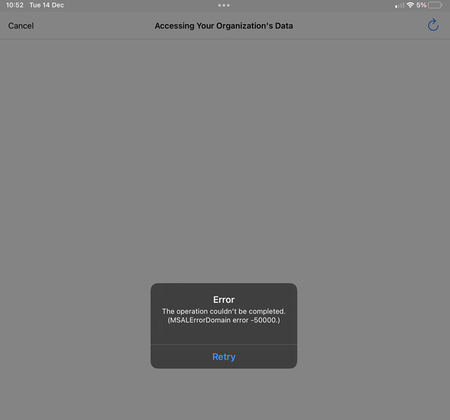
App Protection iOS & Android - the operation couldn't be completed (MSALErrorDomain error -50000)
Hi All! I have a strange behavior. The current setup is: We are using iOS and Android devices with conditional access policies and application protection policies. The conditional access pol...

DrBojlerGyula
Dec 15, 2021Tin Contributor
Unfortunately we the migration to Exchange Online is pendent. 🙂
The CA looks like this:
Assignments:
All Users
Office 365 Apps
Device Plattforms: Android, iOS
Client Apps: Browser, Mobile apps and desktop clients
All device state
Access Controls:
Require MFA
Sign-in frequency: 30 days
-----------------
Terms of use is configured, but is not required for the mobile device conditional access policy.
The CA looks like this:
Assignments:
All Users
Office 365 Apps
Device Plattforms: Android, iOS
Client Apps: Browser, Mobile apps and desktop clients
All device state
Access Controls:
Require MFA
Sign-in frequency: 30 days
-----------------
Terms of use is configured, but is not required for the mobile device conditional access policy.

Dec 15, 2021
I am assuming al these users alrady have mfa :P.
Thats the only policy ? and the app protection ca policy?
Thats the only policy ? and the app protection ca policy?
- DrBojlerGyulaDec 15, 2021Tin Contributor
Sure, they do have MFA. 🙂
The app protection policy is this: (the new one, the older one had a pin length of 4 digits and enabled third party keyboards.
Apps
Target to apps on all device typesNoDevice typesUnmanagedPublic appsMicrosoft InvoicingMicrosoft KaizalaMicrosoft Power AppsMicrosoft EdgeMicrosoft 365 AdminMicrosoft ExcelMicrosoft OutlookMicrosoft PowerPointMicrosoft WordMicrosoft BookingsMicrosoft OfficeMicrosoft OneNoteMicrosoft PlannerMicrosoft Power BIMicrosoft SharePointMicrosoft StaffHubMicrosoft OneDriveMicrosoft TeamsMicrosoft ListsMicrosoft StreamMicrosoft To-DoMicrosoft Visio ViewerMicrosoft WhiteboardCustom apps--Data protection
Prevent backupsBlockSend org data to other appsPolicy managed appsSave copies of org dataBlockAllow user to save copies to selected servicesOneDrive for BusinessSharePointTransfer telecommunication data toAny dialer appDialer App URL Scheme--Receive data from other appsAll AppsOpen data into Org documentsAllowAllow users to open data from selected servicesOneDrive for BusinessSharePointCameraRestrict cut, copy, and paste between other appsAny appCut and copy character limit for any app0Third party keyboardsBlockEncrypt org dataRequireSync policy managed app data with native apps or add-insAllowPrinting org dataAllowRestrict web content transfer with other appsAny appUnmanaged browser protocol--Org data notificationsAllowAccess requirements
PIN for accessRequirePIN typeNumericSimple PINAllowSelect minimum PIN length6Touch ID instead of PIN for access (iOS 8+/iPadOS)AllowOverride biometrics with PIN after timeoutNot requiredTimeout (minutes of inactivity)0Face ID instead of PIN for access (iOS 11+/iPadOS)AllowPIN reset after number of daysNoNumber of days0App PIN when device PIN is setRequireWork or school account credentials for accessNot requiredRecheck the access requirements after (minutes of inactivity)10Conditional launch
Max PIN attempts5Reset PINOffline grace period720Block access (minutes)Offline grace period90Wipe data (days)Jailbroken/rooted devicesBlock accessMin OS version14.0Block accessMin OS version13.0Wipe data- Dec 15, 2021WHen trying to connect, could you share the sign in event from the sign in log? so we can rule out any existing ca's blocking the login.
What happens when you exclude 1 user (to test with) from this app protection policy? (delete the app first to be sure no app protection policy is already applied to it)- DrBojlerGyulaDec 16, 2021Tin ContributorSing in event log: everything normal, State=success, no other conditional access is blocking, also double checked via "what if" tool.
The behavior for the excluded user is normal: there is no message and the user can use teams.