Forum Discussion

Copilot Agent in SharePoint refuses to read uploaded attachments (even though they work in Testing)
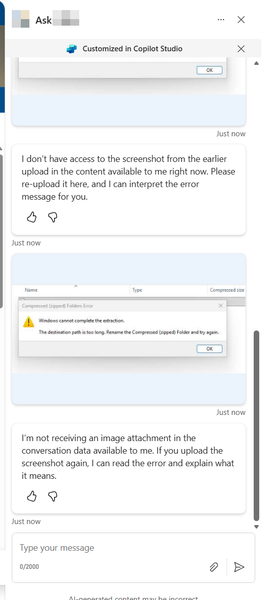

The difference between your screenshots matches a documented channel limitation. Copilot Studio supports file input in its test panel, but Microsoft explicitly says SharePoint does not support that input and attached content is not sent to the agent on unsupported channels. Republish attempts or enabling file processing cannot make the SharePoint channel process those attachments. If conversational uploads are essential, publish to a supported channel such as Teams or a supported web chat and test the same file there. To reduce confusion, try turning File uploads off under Settings, Generative AI, File processing capabilities, then save, publish and test a new SharePoint conversation. Microsoft’s documentation does not promise a separate SharePoint-only paperclip visibility control. If the icon remains despite uploads being disabled, report that interface behaviour with these screenshots. Meanwhile, clearly tell users that attachments are unavailable in the SharePoint version of this agent.
- allcatsaregreyOct 30, 2026Tin Contributor
Thanks Jamony. I turned off File Uploads and the paperclip remains, so looks like that will have to be a training point for users.
thank you!
