troublehooting
19 Topics
"Limit reached: Copilot can chat about the 20 oldest items in your notebook."
"Limit reached: Copilot can chat about the 20 oldest items in your notebook." That the issue occurs in both the Copilot app and Copilot on the web. My account previously showed Premium but now shows Personal. The issue started after recent updates. Can anyone assist wit a fix/solution?4Views0likes0Comments
Accessing copilot app
Hello, I’m using Copilot Basic on a new computer, and for the past two days, I’ve been encountering issues with the embedded Copilot app and the Edge widget. They display the message: "Sorry, I need to verify your request before I can respond. Please try sending your message again." I’ve tried resetting, restarting, uninstalling, and reinstalling both Edge and the Copilot app. I’ve tested this on both of my computers and with an alternate account; my primary account fails to complete a handshake, while the alternate accounts work without issue. My primary account does function on copilot.com, though somewhat inconsistently. Based on this, I suspect the problem may be related to account verification status, authentication token validation, backend entitlement synchronization, or service-side authorization for the Copilot app/Edge experience. I’ve contacted support, and they suggested posting my issue here. Would it be advisable to scrap my primary account and start fresh with a working one? I’m uncertain of my options, but it’s inconvenient not having the services fully integrated.58Views0likes1Comment
Desktop app lost Chat after forced update; only Search mode.
Using office family and as a admin user i have the ability to use the desktop application of copilot. Been using it for 6 months now and is important part of my business applications. In the past 1 had some update notifications and only noticed soms GUI changes after the update. Today i got a forced update in copilot and whole chat stopped while in the middle of python scripting... Result: historie gone (again), copilot learning and saved docs gone, but the worst is: copilot only starts in SEARCH mode, the whole CHAT mode is gone and nowhere to be found. Even repair and re-install didn't solve the CHAT issue in my application. Im using windows 11 pro, office family, Im the admin and therefore allowed to use copilot application on my laptop locally. Using copilot webversion the CHAT function is working properly under my account en did soms hours troubleshooting with this copilot webversion. Conclusion from copilot: Somehow the licencing model changed for office family and the local copilot application cannot connect to the proper licencing server of database. Advice from copilot: make contact to support from microsoft. In in the chat with a technical support came the advice to post my issue here. Hope that someone knows the solution to my Copilot-Chat issue ;-)Solved175Views0likes4Comments
Copilot Notebooks shows "Se produjo un error" when processing PDF files (Case 7110857252)
Hola. Utilizo Microsoft 365 Personal y Copilot desde Microsoft Edge. Creé un cuaderno en Copilot Notebooks para estudiar material de un curso y agregué varios archivos PDF como referencias. Los archivos se cargan correctamente y aparecen en la sección de referencias del cuaderno. Sin embargo, cuando intento utilizar las funciones "Resumir mi bloc de notas" o "Sugerir preguntas para este bloc de notas", Copilot muestra el mensaje "Se produjo un error". El problema ocurre con distintos archivos PDF y persiste desde hace varios días. He contactado con el soporte de Microsoft (caso 7110857252) y me indicaron que existen reportes similares de otros usuarios relacionados con el procesamiento de archivos PDF y contenido en Copilot Notebooks. ¿Alguien más está experimentando este problema o conoce alguna solución temporal? Gracias.99Views0likes2CommentsConfiguring Copilot chat retention policies
We're looking at implementing a 30-day retain-and-delete policy for Microsoft Copilot chats and have a couple of questions. Firstly, is the retention period applied to the chat as a whole or to the individual prompts and responses within that chat? For example, if a user starts a chat on Day 1 and then goes back into the same chat on Day 20 to ask another question, does that new activity effectively keep the whole chat for another 30 days? Or are the original prompts and responses still deleted 30 days after they were created, regardless of later activity in the same conversation? Secondly, what happens if a Copilot chat is moved into a Copilot Notebook? Does the same retention policy still apply to the chat content, or does moving it to a notebook change how long it is retained? More generally, if users need to keep Copilot content for longer than 30 days, what is the recommended approach? For example, would moving the chat to a Notebook preserve it beyond the retention period, or would users need to save the content elsewhere, such as a Word document, SharePoint site or another M365 location? Any guidance would be appreciated. Thanks147Views0likes2CommentsCopilot Agent in SharePoint refuses to read uploaded attachments (even though they work in Testing)
We deployed a Copilot agent to SharePoint, customized in Copilot Studio. It works pretty well. But it can never read uploaded files, even though File Activity is turned on in SETTINGS, and even though uploaded files are read in the Testing environment in Copilot Studio. We have republished the agent multiple times. Is this a Microsoft bug/limitation, or have we set something up incorrectly? And if it's not meant to work, is there a way to remove that paperclip so users aren't tempted to try it? I can see them getting discouraged and abandoning the agent altogether. I asked Copilot for help, and it said it is what it is.179Views0likes2Comments
Copilot in Word changed dramatically overnight and no longer provides the experience I paid to use
I am reporting a significant change that appears to be specific to Copilot in Word. Importantly, this is not a general Copilot account issue. The standalone Copilot app still contains my previous chat history, including chats that originated from Word before this change occurred. The problem appears to be isolated to the Word Copilot experience. Beginning on October 16-17, 2026, Copilot in Word changed dramatically: Previous Word Copilot chat history disappeared, leaving only newly created chats visible. Copilot in Word now states that it can only remember information within the current chat. Personalized preferences that previously carried across conversations no longer appear to work inside Word. The editing workflow has completely changed. Previously, Copilot presented one suggestion at a time inside a dedicated suggestion card. The prior interface used navigation arrows to cycle through alternatives and had clear Apply and Skip/Cancel actions. The new interface generates large numbered lists of suggestions and critiques instead of interactive rewrite cards. The writing assistance feels less natural, less personalized, and noticeably less human than before. The Copilot interface behavior and layout have also changed. My concern is not simply that the interface looks different. I upgraded my Microsoft 365 subscription to Premium primarily because of the Copilot experience in Word. I use Copilot heavily for editing school assignments and writing projects and often complete large amounts of work in a single session. The previous Word Copilot experience helped organize my writing, preserve my voice, and provide efficient rewrite suggestions without sounding like I ran my work through an AI bot. One of the main reasons I chose Copilot over competing AI tools is that it consistently felt more natural and more human when helping me edit and refine my work. The most significant change is not the appearance of the interface. The entire interaction style has changed. Previously, Copilot in Word felt like collaborating with an editor who reviewed my writing and helped improve it while preserving my voice. The new experience feels more like receiving an automated analysis report from a machine. Instead of helping me refine my writing through natural rewrites and conversational suggestions, it now generates long lists of critiques and recommendations. While those recommendations may be technically correct, they do not provide the same experience or value. They also do not consistently reflect the writing style, tone, and preferences that I had previously taught Copilot to remember. Instead of receiving rewrites that already sounded like my work, I now have to interpret the feedback and manually rewrite or adjust it so it sounds like me again. This adds additional effort and makes the editing process significantly less efficient than it was before. Because the standalone Copilot app still has my previous history, this appears to be a change in Word Copilot itself rather than an account-wide issue. I would like Microsoft to confirm: Whether Word Copilot was recently moved to a new experience or editing workflow. Whether the disappearance of all prior Word chat history is expected. Whether cross-chat personalization or memory behavior has changed. Whether the previous suggestion-card workflow, editing style, or interaction model can be restored or selected as an option. I understand that Copilot is an AI system, and I do not expect it to behave exactly like a human editor. However, one of the reasons I chose Copilot over competing tools was because it consistently helped me improve my writing while preserving my voice and reducing the amount of editing I had to do myself. After this update, I have found myself relying on Copilot less because it no longer provides the same level of personalized editing assistance, voice preservation, and workflow efficiency that I previously depended on. This change was immediately noticeable and has significantly reduced the value I receive from the Microsoft 365 subscription I purchased specifically to use Copilot in Word. I am not requesting new features. I am trying to understand whether this change was intentional, whether the previous Word Copilot experience is still available, and whether some of these issues may be related to the disappearance of my prior Word Copilot chat history and personalization. If most of these changes are the result of a history or personalization issue, I hope they can be resolved as quickly as possible so I can continue using Copilot the way I did before. However, if the behavior I am seeing is the result of a permanent redesign of the Word Copilot experience, I will need to reconsider whether maintaining my Microsoft 365 Premium subscription continues to provide the value that originally led me to purchase it.560Views0likes5Comments
Agent Builder agents require Microsoft 365 Copilot license for users without a license?
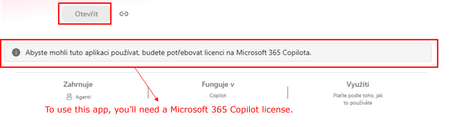
Hi all, Has anyone noticed a recent change in how Copilot Agent Builder (in Copilot Chat) agents work for users without a Microsoft 365 Copilot license? Our setup is: Agent created by a user with a Microsoft 365 Copilot license Created directly in Agent Builder, not published through Copilot Studio The agent is published and available within our tenant Some consumers do not have a Microsoft 365 Copilot license Copilot Credits are available (also for the environment where the agent is) and have not been exhausted This setup was working normal ly just two days ago. Unlicensed users could use the shared agents and usage was covered by Copilot Credits. Now those same users are getting a message saying that a Microsoft 365 Copilot license is required. Has anyone else started seeing this? I’m trying to understand whether we are looking at a configuration issue in our tenant or whether something has recently changed in the service/licensing behavior. Thanks for experiences!537Views1like4Comments
Please Remove Daily Cap Usage for Free Copilot Text Chat
Dear Microsoft Copilot Team, I am writing to express my disappointment with the new daily usage caps on Microsoft Copilot, particularly for ordinary text-based conversations. In the past, I could use Copilot freely for everyday questions, learning, research, brainstorming, and general conversations without constantly worrying about reaching a daily limit. The newer restrictions have made the experience significantly more frustrating and less useful. I understand that running AI services requires computing resources and that Microsoft must manage operating costs. However, I believe ordinary text chat should remain uncapped, especially when it was previously possible to use Copilot much more freely. Text conversations are a fundamental part of the service, and users should not have to stop in the middle of a useful discussion because they have exhausted a daily allowance. The move toward a unified Copilot experience should make the product simpler, more consistent, and more useful—not make existing users feel that they have lost access to a service they have come to rely on. I am therefore asking Microsoft to: Remove daily usage caps entirely for ordinary text-based Copilot conversations, including for free users. Keep basic text chat freely accessible without arbitrary daily cutoffs or lengthy waiting periods. If stricter limits are necessary for resource-intensive features such as image generation or advanced research, apply those limits separately rather than restricting ordinary text conversations. Clearly communicate any usage policies and reconsider changes that negatively affect the experience of long-time users. Unlimited text chat would help preserve user trust, encourage continued engagement, and distinguish Copilot as an accessible AI assistant for everyone. Restricting basic conversations risks pushing loyal users toward competing services that offer a more suitable experience. I hope Microsoft will take this feedback seriously and reconsider the current daily cap policy. Please restore uncapped text chat so users can rely on Copilot whenever they need assistance, without worrying about running out of messages. People on Reddit and online have been criticizing these changes ever since Copilot was unified under one product between enterprise and personal, If you guys dont do anything now it might reduce user trust and might be bad business decisions so please fix Copilot Thank you for your time and consideration. I look forward to seeing Microsoft make Copilot more accessible and user-friendly again.602Views6likes2CommentsMicrosoft Copilot Desktop App: Work account login loops back – sign out of personal account to fix
If the Microsoft Copilot desktop app repeatedly redirects work-account sign-in to the browser and returns to “Sign in to Copilot”, check whether the browser is simultaneously signed into personal and work Microsoft accounts. Signing out of the personal account may allow the work-account desktop sign-in to complete. I used Copilot to try to investigate my problem with the Desktop App - it would provide a mechanism for me to sign in, but it did so by launching a browser window, whilst the App itself returned to the login screen. That wasn't what I wanted - I have too many browser tabs open already! Copilot went a long way down the networking/proxy route, and then by chance I discovered this very much simpler solution in an identity-session conflict. Symptoms: Copilot desktop app always loops back to showing “Sign in to Copilot” after completing the sign in. The Work authentication appears to be successful. The “Which Copilot experience are you looking for?” screen appears. Choosing the work experience opens copilot.cloud.microsoft in the browser. Desktop app remains signed out and loops back to "Sign in to Copilot". Cause: The browser was simultaneously signed into personal and work Microsoft accounts. Resolution: Signing out of the personal account allowed the desktop work-account login to succeed.467Views0likes1Comment