Forum Discussion

AnthonyLP
Jul 12, 2023Brass Contributor
Visio : Embed a visio that contains pmany pages into visio
Hi, I'm not sure is my title is talking to you. Let me explain what i want to do 1 have one visio that is called Processes 1 have an another visio that contains many pages. . I would lik...

NikolinoDE
Jul 13, 2023Platinum Contributor
There are two ways to embed a Visio that contains many pages into another Visio:
- Paste with link: This will create a linked copy of the Visio file in the new Visio file. The links will be kept, but if you make changes to the original Visio file, the changes will not be reflected in the linked copy.
- Embed as object: This will embed the Visio file as an object in the new Visio file. The links will not be kept, but if you make changes to the original Visio file, you can update the embedded object to reflect the changes.
To paste with link, follow these steps:
- Open the Visio file that you want to embed.
- Select the pages that you want to embed.
- On the Home tab, in the Clipboard group, click Copy.
- Open the Visio file where you want to embed the pages.
- On the Home tab, in the Clipboard group, click Paste.
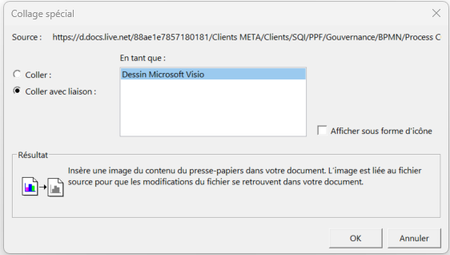
- In the Paste Special dialog box, select Paste with link.
- Click OK.
To embed as object, follow these steps:
- Open the Visio file that you want to embed.
- Select the pages that you want to embed.
- On the Home tab, in the Clipboard group, click Copy.
- Open the Visio file where you want to embed the pages.
- On the Home tab, in the Clipboard group, click Paste.
- In the Paste Special dialog box, select Paste as Object.
- Click OK.
The best way to embed a Visio that contains many pages into another Visio depends on your specific needs. If you need to keep the links between the Visio files, then you should use the "Paste with link" method. If you don't need to keep the links, then you can use the "Embed as object" method.
Here are some additional tips for embedding Visio files:
- If you are embedding a large Visio file, you may want to consider compressing the file before embedding it. This will reduce the file size and make it easier to embed.
- If you are embedding a Visio file that contains multiple pages, you can choose to embed all of the pages or just a selected few.
- You can also choose to embed the Visio file as a floating object or as a background object. A floating object will be displayed in front of the background of the Visio file where it is embedded. A background object will be displayed behind the background of the Visio file where it is embedded. My knowledge of this topic is limited, but since no one has answered it, I entered your question in various AI. The text and the steps are the result of various AI's put together.
My answers are voluntary and without guarantee!
I hope this helps!