Forum Discussion

user2350792
May 15, 2024Copper Contributor
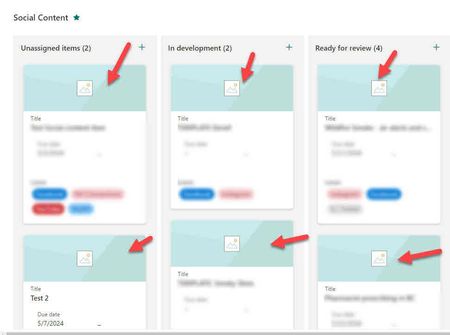
SPO board view not displaying card image preview on page load
My team is moving away from Trello and onto SharePoint lists for the customizations and automaton M365 has. We use these lists/boards for tracking, scheduling, and content development. I'm setting...

CodeFreeIntegrator
May 20, 2024Copper Contributor
This seems to be a pretty common issue - just Googling "Sharepoint thumbnail issue" yields a ton of complaint threads.
In terms of "why" it's happening, it sounds like a case of "lazy loading" - the page isn't showing everything the second you open it in order to speed up the appearance of a loaded page. It's trying to prioritize what it thinks you want to see. If that's the case, you could try editing the JSON to remove/modify elements related to lazy loading (if you can identify them).
Since changing to the gallery then back to Kanban makes the images appear, it seems the most likely reason why this is happening.
This isn't ideal, but maybe there are third-party apps or add-ins that offer better/different Kanban board views. Finding one that works for you and using it might solve the problem.
In terms of thumbnail image formats, you could also try reducing the size of each thumbnail to get them as small as possible.
Actually, instead of linking directly to full-size images in your JSON you could generate small thumbnail versions and use those in the board view instead.
Anything like that to reduce the page load time should help. Good luck!
In terms of "why" it's happening, it sounds like a case of "lazy loading" - the page isn't showing everything the second you open it in order to speed up the appearance of a loaded page. It's trying to prioritize what it thinks you want to see. If that's the case, you could try editing the JSON to remove/modify elements related to lazy loading (if you can identify them).
Since changing to the gallery then back to Kanban makes the images appear, it seems the most likely reason why this is happening.
This isn't ideal, but maybe there are third-party apps or add-ins that offer better/different Kanban board views. Finding one that works for you and using it might solve the problem.
In terms of thumbnail image formats, you could also try reducing the size of each thumbnail to get them as small as possible.
Actually, instead of linking directly to full-size images in your JSON you could generate small thumbnail versions and use those in the board view instead.
Anything like that to reduce the page load time should help. Good luck!