Forum Discussion

CONDITIONAL FORMATTING - EXCLUDE/SKIP TEXT
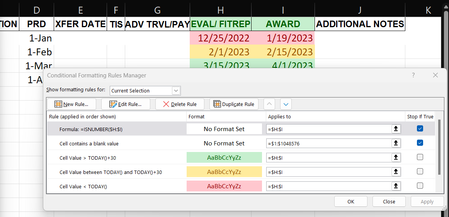

OliverScheurich I can enter text in any row; however, I want to have the rows with text remain white or unaffected by the conditions causing the cells with dates to change color. As of now, they change color to green even if there's just one letter typed in.
Okay, So I should try removing the quotes? And coloring the cells themselves is preferable to coloring the letters. I'll try attaching the file too.
Update: Looks like the xlsx/xlsb file types aren't supported here. Can't attach the file.

Attached is my sample file. Maybe this is helpful. As far as i know it isn't possible to manually format the background color of a cell if it's (background color is) already formatted by conditional formatting.
=OR(ISBLANK($H1),ISBLANK($I1))This is the rule for conditional formatting if a cell is blank. The chosen format is white. The rules have to be entered without quotation marks as shown in the screenshot. Otherwise they aren't recognised and don't work.