Forum Discussion

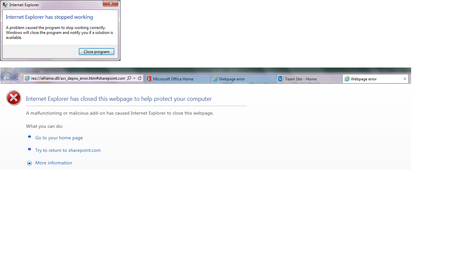
SharePoint Online - IE 11 - message 'Internet Explorer has stopped working'
 Jul 17, 2017
Thank-you so much. Your ":P" solved the whole thing.
Please check the link, doesn't work for me. Going back to older version could cause more troubles.
Just for the notes, It's working fine after the last round of ding-dong with the add-ons. Yesterday I needed to attend a WebEx meeting which resulted in enabling the below add-on and IE started crashing again. Disabling it made the IE work again and able to access the SharePoint Online sites.
Note: My system is 64-bit OS (Windows 7 Ultimate), these add-ons are 32-bit. I think that should be fine. There was no option to select between the two when installing these add-ons.
After updating the office products yesterday (as Word, Excel etc were giving a message of updates available), the IE started crashing again this morning when trying to access the SharePoint Online sites. Disabling the following add-ons did not solve the problem. This was the only add-on enabled on my computer. Quick Repair of office did not help either. I am switching to Chrome and with the hope that some miracle update from Microsoft fixes it on it's own.
- Vivek JainOct 03, 2017Brass Contributor
The issue has been back for past week or so. Tried following workaround:
1. If I go a SharePoint Site link via a URL I shared in email to a colleague (instead of opening a site using the SharePoint "tiles" in O-365) then the SharePoint site opens fine and allows to go to the main site I was trying to go to via the "tiles".
2. Tried checking for offedning DLL, by going to 'Computer Management' (see screen below). It did not help as it shows the name as 'unknown'.
3. Tried 'resetting' the IE (Tools -> Advanced -> Reset -> Delete Personal Settings) and restarted the computer. The first time I tried accessing SharePoint after that it gave the same message of 'Internet Explorere has stopped working'. But on second tries onwards it's working fine. Fingers crossed :).
 Muhammad Ali BhattiOct 06, 2017Copper Contributor
Hi,
It happens for me as well, when ever i go into sharepoint it crashes with same error.
I have also tried all the options discussed above, but nothing helped.
- Nate CaponeOct 04, 2017Copper Contributor
This is a shot in the dark, but I've had success with the repair function before, so you may want to try Control Panel > Programs > Programs & Features > select Microsoft Office 365 > click Change > Online repair. After it's done in 20-60 minutes, restart your machine and cross your fingers!
- Vivek JainOct 05, 2017Brass Contributor
I had tried the 'quick repair' without success. I had done 'Online Repair' two week before this issue surfaced.
As a workaround, I continue to acces SharePoint site via a "bookmarked" link (instead of selecting a site from a SharePoint "tile"). Accessing via "tile" continues to abend the IE.
