Forum Discussion

Reports Reader Admin Role irrelevant?
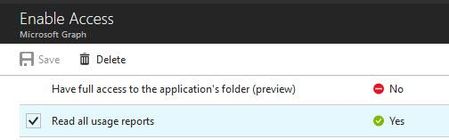

Thanks Vasil,
but now i have the following questions:
you said:
"Unless you as the admin have granted consent to all users, they will not be able to obtain such token"
Within Delegated Permissions (Azure AD App Settings) you can not assign it to individual users. It is always granted to all users but restricted based on the following (cited from MS documentation)
"the least privileged intersection of the delegated permissions the app has been granted (via consent) and the privileges of the currently signed-in user"
So the first question is, If above statement (least privileged intersection) is not true, how can i restrict a normal user then ?
the second question is in regards to the "Reports Reader Role":
MS says , that users with the Reports Reader Role can access the Reports via Admin Center and any reports exposed through the reporting APIs.
So why does this Role exists then ?
thanks

Stefan, I'm in no way an expert of Graph or even a programmer for that matter, I was just trying to explain things the way I see them. Obviously I'm not very good at that :)
My point was that you should use the built-in AAD role if you want to grant certain person access to the reports functionality. They way I understand it, "Reports Reader" is a role "described" in one of the underlying/built-in "applications" in Office 365/Azure AD. And "assigning" the role in the portal basically grants the relevant assignment of the underlying app to the user.
On the other hand when you are creating a custom application, you are in charge of describing the permissions, and are (or should be) aware that some permissions require Admin consent, which as you correctly mentioned applies to the entire directory. Thus once you add (and consent to) application that has the Reports.Read.All scope, every user in the organization will be able to get a token/access any resource the app grants permissions to.
To control who gets access to the functionality exposed by said app, *you* should describe/create roles/scopes for that application. Which is one of the things you can control on the Assignments page in the portal (https://docs.microsoft.com/en-us/azure/architecture/multitenant-identity/app-roles). By default a single "Default Access" role is created for each application, meaning that everyone will have the exact same access (unrestricted access to all the resources the application has been granted consent to).
Do correct me if any of the above is wrong, I'm also trying to make sense of this whole thing :)
- StefanFriedMay 23, 2018Steel Contributor
thank you vasil
your input make absolutely sense and it gave me also the hint in regards to App-Roles.
I was NOT aware of AppRoles at all because in the UI there was no indication that you can assign Roles to apps (i would have expected at least a button instead of manually modifying the manifest ).
And assigning users to a role via PowerShell only (without the chance of doing it via UI) is also a bit strange :)
but anyway....that's the way
However there is one single fact:
that the citied MS statement ....
""the least privileged intersection of the delegated permissions the app has been granted (via consent) and the privileges of the currently signed-in user"
..is absolutely WRONG !
lesson learned....i will NOT ask Microsoft for further details
thanks again for your help..i owe you a beer :)
cheers
stef