Forum Discussion

Hide the 'works with' information on the Office 365 profile card
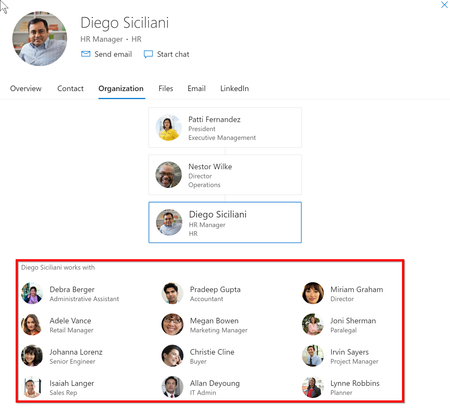
- Jul 24, 2019AFAIK, there is not currently a way to customize the people card in Office 365


3 of 5 users has "lost works with". (45 hours since enabling).
Side effect, we have organization chart (manager registered). Selecting a "disabled" user does not show coworkers. However, selecting an "enabled" coworker shows the disabled user. For us, this does not matter what so ever and we totally do not care. Being in an organization chart is not an unintentional disclosure of information.
Final update from me.
After about 50 hours, all initial test users in the group did not show any "works with".
Additional 5 test users was added and everything works as expected.
Perfect! Thanks.
 Olivegreen2080Jun 30, 2022Copper Contributor
Hi guys, Does anyone have an idea if there is a limit of API request call that can be made for peopleinsight using MS Graph.
I have been sending API calls using MS Graph to Patch Peopleinsight , got no error but no changes for 48hrs.
Suggestions or ideas please
- Olivegreen2080Jun 16, 2022Copper Contributor
TonyRedmond I am trying to re-enable the group , is there a way to do that because I didn't get the outcome. I tried disable as Null but failed .
- TonyRedmondJun 15, 2022MVPYou will have to ask Microsoft to access your tenant and check things out. I can't do remote debugging without access to your tenant.
- Olivegreen2080Jun 15, 2022Copper ContributorHi Tony, checked this morning it disables the organization tab as shown in the pics I sent yesterday and not only the work with.
I mean I cannot view the organization tab on the user's contact car anymore.
Is there a code I am missing because I followed the instruction on the article. - olivegreenJun 14, 2022Copper Contributor
This was what I had before. Organization tab grayed out.
Tried again and should have feedback by tomorrow.
Will let you know. Thank you
- TonyRedmondJun 14, 2022MVPYou'll have to wait and then check one or two people. I don't think you need to check everyone listed in the group and you probably won't be able to access some of those mailboxes...
- olivegreenJun 14, 2022Copper Contributor
I think I gat what you mean.
After updating the peopleinsight using Microsoft graph by creting a group
Then to check the changes, I will have to login to each user's outlook to view contact card right.
I apologize if I am stressing, I really appreciate your help.
Thanks
- TonyRedmondJun 14, 2022MVPGroups don't display the organization tab if viewed through the people card. I don't see the organization tab for any group in my tenant. This isn't surprising because groups do not have an organizational structure. Sorry if I am missing your point, but if you're having difficulties making something work in your tenant, it's kind of difficult to debug without access to your tenant... you could always file a support request to have Microsoft support take a look.
- olivegreenJun 14, 2022Copper Contributor
Thanks Tony. Not for the entire tenant. It was disabling the entire oragnization tab for the group on the contact card.
I mean the organization tab was totally disabled for the group not the work with.
- TonyRedmondJun 14, 2022MVPAre you saying that People Insights is disabled for everyone in the tenant rather than just the members of the Microsoft 365 group?
If so, check the settings for PeopleInsights and verify that IsEnabledForOrganization is True and disabledForGroup holds the identifier for the Microsoft 365 group. - Olivegreen2080Jun 14, 2022Copper Contributor
TonyRedmond thank you for your reply, I created a 365 group and followed the article but result disabled the whole organisation tab on the card.
Is there something else am missing .
I used the graph and the cmdlet.
- TonyRedmondJun 14, 2022MVPA little late to the party, but I've documented the ins and outs of hiding People Insights at https://office365itpros.com/2022/03/02/people-insights/...
- JensKuenzlerJun 13, 2022Copper Contributor
Hi Olivegreen2080 ,
this Microsoft Docs article describes how to configure it using MS Graph.
https://docs.microsoft.com/en-us/graph/api/organizationsettings-list-peopleinsights?view=graph-rest-beta&tabs=http
Graph URI: (replace {organizationID} with your tenant ID)
https://graph.microsoft.com/beta/organization/{organizationId}/settings/peopleInsights
Try this query code:{ "isEnabledInOrganization": true, "disabledForGroup": Null } - Olivegreen2080Jun 13, 2022Copper ContributorThanks Jens, I have tried that it grayed out the organization tab on the contact card . If you used Microsoft grah , h can share the query you used .
- JensKuenzlerJun 12, 2022Copper Contributor
Hi olivegreen ,
I recently used the MS Graph SDK to disable the "works with" (PeopleInsights) feature.
Meanwhile, it is also possible to configure it via Admin Center:
https://admin.microsoft.com/#/MicrosoftSearch/configurationsYou can try these lines of PowerShell to configure it (replace with your your tenant name)
Install-Module Microsoft.Graph Import-Module Microsoft.Graph -force Select-MgProfile -Name "beta" $TenantID="3e062688-79ca-41ec-855c-xxxxxxxxxxxx" $Permissions="Directory.ReadWrite.All","Directory.AccessAsUser.All","User.ReadBasic.All","User.ReadWrite" Connect-MgGraph -Scopes $Permissions -TenantId $TenantID Update-MgOrganizationSettingPersonInsight -OrganizationId $TenantID -IsEnabledInOrganization:$false - olivegreenJun 12, 2022Copper Contributor
Hi, you said you were able to hide the work with for some group of people without disable the organization tab section right
Can you share the script used?
- JensKuenzlerMar 25, 2022Copper ContributorThank you Nicki, that worked for me! The Graph SDK cmdlet Get-MgOrganizationSettingPersonInsight worked as well.
- NickiBorellMar 25, 2022MVPWith these permissions it worked for me:
- Directory.AccessAsUser.All
- User.Read
- User.ReadBasic.All
- User.ReadWrite - JensKuenzlerMar 25, 2022Copper ContributorHi Nicki, I'm struggeling to set peopleInsights using Graph Explorer. Could you perhaps give me a hint which permissions are needed? I already tried User.ReadWrite.All","Organization.ReadWrite.All","Directory.ReadWrite.All" - but no luck. Thanks!
 PeterNjorogeMSMar 03, 2022
Microsoft
After investigation seems the issue is not the API, that works as it should, the cache is the issue, before it's refreshed it take time.- NickiBorellFeb 24, 2022MVPIt looks like you just have to wait long enough. 24h was definitely not enough, but now the setting is also working for me and "work-with" is no longer displayed for the users in the corresponding Azure AD group.
- PeterNjorogeMSFeb 24, 2022Hi Raymond, Do you mind sharing the tenant name and ID you are using with me. Even if it's a test account. I want to follow up.

