Forum Discussion

TheHailender
Jul 24, 2019Brass Contributor
Hide the 'works with' information on the Office 365 profile card
Hello, Is it possible to hide the works with Information in the organization-tab on the Office 365 https://support.office.com/en-us/article/Profile-cards-in-Office-365-e80f931f-5fc4-4a59-ba6e-c1e35a...
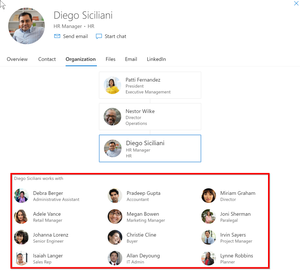
- Jul 24, 2019AFAIK, there is not currently a way to customize the people card in Office 365


NickiBorell
Jan 27, 2022MVP
I can use the API as documented. No error comes up, however nothing does either. No matter in which combination.
No matter if I only used "isEnabledInOrganization: false”.
Or set it to a group with "disabledForGroup": "f12353948d-3423-4ac7-9616-d6237975c00g".
If what was written here by Jorge Agudo Martín is true: "".: "Microsoft Premier Support told us the "Works With..." feature can only be disabled by their Engineering Team at the moment" then it would be clear why it doesn't work when I try it via the API.
But then the docs would also be wrong: https://docs.microsoft.com/en-us/graph/api/insightssettings-update
No matter if I only used "isEnabledInOrganization: false”.
Or set it to a group with "disabledForGroup": "f12353948d-3423-4ac7-9616-d6237975c00g".
If what was written here by Jorge Agudo Martín is true: "".: "Microsoft Premier Support told us the "Works With..." feature can only be disabled by their Engineering Team at the moment" then it would be clear why it doesn't work when I try it via the API.
But then the docs would also be wrong: https://docs.microsoft.com/en-us/graph/api/insightssettings-update

PeterNjorogeMS Microsoft
Feb 21, 2022MicrosoftNickiBorell Thank you for the feedback. We incorporated some feedback from several customers which might have affected the controls. They should now be working. Kindly, run the commands again and share feedback.