Forum Discussion

Dennis Haxe
Nov 01, 2019Brass Contributor
Delete Business APPS for all users
Hi, When new users logs in they see a bunch of apps and I don't know where to disable them. Example: Thanks in advance.
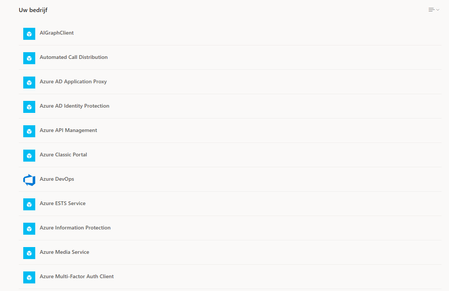
- Nov 01, 2019Hi Dennis Haxe,
Azure AD
https://aad.portal.azure.com/ > Enterprise Applications > All Applications
You can either remove them or you can switch off whether they are visible to users
Hope that answers your question!
Best, Chris

Nov 01, 2019
You can hide the applications. Click on them and there is an option which says make these visible to users. Simply switch off and save :white_heavy_check_mark:
Best, Chris
Best, Chris

Dennis Haxe
Nov 01, 2019Brass Contributor
ChrisHoardMVP I'm sorry Christopher but I cannot find it  Could you provide me with a screenshot? Thanks!!
- Nov 01, 2019https://aad.portal.azure.com/ > Enterprise Applications > All Applications > Click into app > disable make visible
Best, Chris- Dennis HaxeNov 01, 2019Brass Contributor
- Nov 29, 2019
Sorry have not got back to you in a while. Been massively busy since Ignite.
Should be under properties. Here is a screen shot
At the bottom. Hope that helps!
Best, Chris