Forum Discussion

oa_kg
Dec 08, 2025Copper Contributor
Outlook MacOS - Email-section display issue
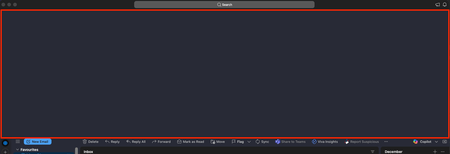
Since the latest Outlook update for MacOS - Version 16.105 (25120324) - there is a display error in the email-section. There is a large empty space between the "Search"-Header and the "Email"- Header...

maurobalsano
Dec 08, 2025MCT
Hello oa_kg it looks like a UI-layout glitch after the 16.105 update.
Try these few quick things to try:
- Switch between New Outlook and Classic Outlook
- Outlook > New Outlook toggle OFF Classic > restart
- Then toggle it ON again if needed: if the gap only happens in one mode, it’s a UI bug specific to that version.
- Reset the view-reading pane
- View > Reset View,or toggle Reading Pane on/off: sometimes the mail list pane height gets stuck.
- Clear cache and/or rebuild profile
- Close Outlook > open Outlook Profile Manager > rebuild or create a new profile and re-add the account.
- Safe Mode / disable add-ins
- Try starting Outlook without add-ins or disable any third-party ones: add-ins can break pane rendering.
- Uninstall and reinstall the app
- Move the app into recycle-bin and re-install it: often corrupted libraies and keys compromises the correct app functionalities.
If none of these help, it’s likely a bug in 16.105. Best next step is to report it via Help > Contact Support / Send Feedback in Outlook, including your screenshot + version number.
Please let us know if that helps.