Forum Discussion

lielamfuller
Feb 15, 2023Copper Contributor
Outlook 365: Duplicate conference room names showing under locations
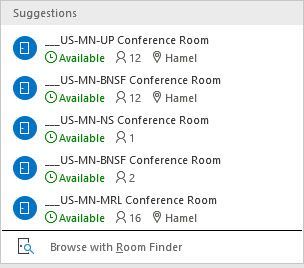
We recently changed our conference room names and since that time, we've noticed that some of our users are seeing multiple entries for conference rooms. When the users attempt to select the room on ...

peachtreegroup
Apr 12, 2024Copper Contributor
Can you help explain how you fixed it in OWA? I don't see where I can do so and I've been trying through EOL and Powershell. We have duplicates that are referencing older email addresses for the room and no longer exist but it won't go away.
Each one puts a different email in the invite but when using get mailbox in powershell, they all pull the same object

ThomasSchwoerer
Apr 12, 2024Iron Contributor
To fix the issue for yourself, you would have to go to your OWA and enter the room and when you hover over the "bad" room, an 'x' will appear and that will clear it from your list. This only fixes for yourself. There is no way to fix for everyone.
Note that you would need to start waiting 60 minutes between the room name change and the setting of places data to prevent this from occurring again.
Note that you would need to start waiting 60 minutes between the room name change and the setting of places data to prevent this from occurring again.
 Lucas_MooreJun 19, 2024Copper ContributorHi Thomas,
We are repeatedly having this issue for a customer of ours, despite removing the duplicate room from OWA it seems to appear again after a short while, wondering if maybe we are missing something, what did you mean by this "Note that you would need to start waiting 60 minutes between the room name change and the setting of places data to prevent this from occurring again. " ??