Forum Discussion

Multiple Reply Buttons on Message
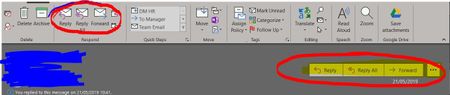

From what I can see and information you provided , it seems that you added these buttons to "Quick Access ToolBar".
To remove them, please navigate to: File > Options > Quick Access ToolBar>? Select and remove the ones added to the right side box. Then un-check "Show Quick Access Toolbar below the ribbon".
 chris_o2019Jun 14, 2019Copper ContributorHi Deleted. Thanks for the reply but that's not it. The Quick Access toolbar is at the very top of the screen, not above the body of the mail message.
- Jun 14, 2019Far as I know. You can't
- AnonymousJun 14, 2019Not applicable
Sorry, I probably need more information to help you.
Is it happening just for you? Other users affected?
Have you done a "reset view" on Outlook?
Are you a office365 User?
Thank you
Dav,
- chris_o2019Jun 14, 2019Copper Contributor
DeletedI've got a laptop and desktop. The laptop is fine but the desktop is not. I've triued resestting the view but those massive buttons above the mail message are still there.
I've just compared settings and they're identical so I have no idea why those buttons are being displayed.
