Forum Discussion

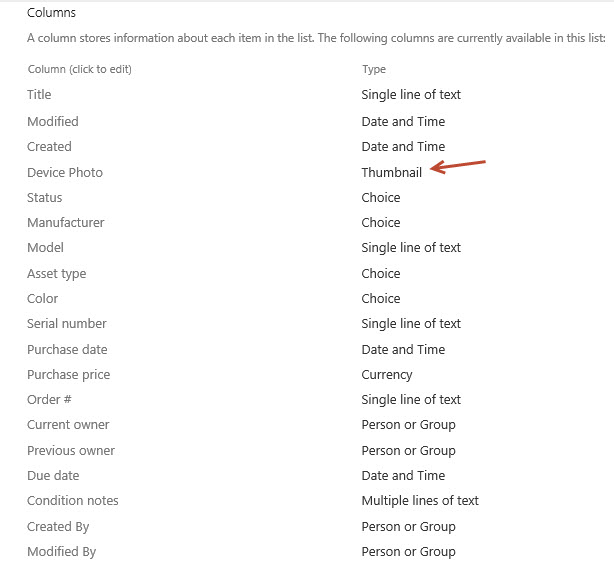
Microsoft List template Asset Manager Column type "Thumbnail"
 Sep 08, 2020
Hi all,
I found out what happened - you can see from here, the "Improve Image column" with under development, for release some time in September.
https://www.microsoft.com/en-gb/microsoft-365/roadmap?filters=&searchterms=64872
Alvin

2 things.
1) It seems that the fix is in for adding an image to the Device Photo column. I had a previously "broken" MS List using the Asset Manager template that now allows uploading a photo - and a new List created today is also working for uploading to the Device Photo column.
2) What is still not fixed is the Gallery view and the display of the device's photo. But I believe I have found the fix. In the JSON code for the Gallery view change this line as follows:
"src": "=if([$DevicePhoto] == '', '', [$DevicePhoto])",to
"src": "=if([$DevicePhoto] == '', '', [$DevicePhoto.serverRelativeUrl])",
I tracked down the available properties on an image field from this https://docs.microsoft.com/en-us/sharepoint/dev/declarative-customization/column-formatting#code-try-44:~:text=The%20image%20field%20object%20has%20the%20following%20properties%20(with%20example%20values)%3A.
Important to note - case matters - so "ServerRelativeURL" will not work.
The image field object has the following properties (with example values):
{
  "fileName": "image.png",
  "id": "6bb1d843-0633-4c9a-9a16-90bc5abd1d8e",
  "serverRelativeUrl": "/teams/Discovery/SiteAssets/Lists/ad6ed939-0db2-4d85-8a39-8f3497f41eee/image.png",
  "serverUrl": "https://contoso.sharepoint.com"
}
- Sara LaidlawNov 04, 2020Brass Contributor
Mine looks like this:
},
"attributes": {
"src": "=[$DevicePhoto.serverUrl] + [$DevicePhoto.serverRelativeUrl]",
"title": "[$DevicePhoto.fileName]",
"class": "sp-card-imagePreview"
}Should I replace it with :
"src": "=if([$DevicePhoto] == '', '', [$DevicePhoto.serverRelativeUrl])",
- Joe GasperNov 04, 2020Brass Contributor
Hi, Sara Laidlaw
Your code looks a little different from the default code in the Asset manager Asset gallery, but I think you could set that line as just:
"src": "[$DevicePhoto.serverRelativeUrl]",
(The If statement should work also, it's just a check for if there is an image provided.)
- Sara LaidlawNov 04, 2020Brass Contributor
Odd, I used the Asset Manager list template today.
Maybe they are working on it. But it isn't right yet.
Thanks!