Forum Discussion

Hybrid Migration - EOP
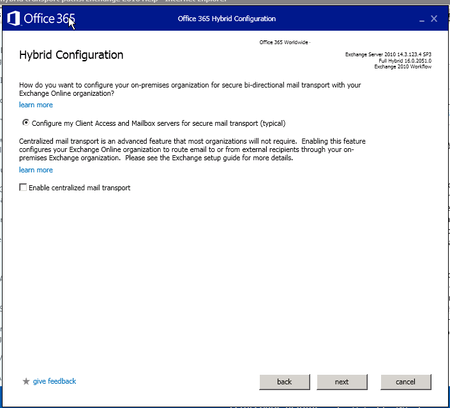

Hi Nuno,
Thanks for the response. So just to clarify what you said, the wizard will create new connectors and leave the existing connectors alone?
Regards,
Alex

That’s how it worked for us. I simply disabled the old connectors until mail flow was confirmed, I then removed them leaving the new hybrid ones in place.
- office 365adminNov 22, 2017Tin Contributor
Thanks for your reply Ian,
I will be doing it out of hours so it shouldn't be too much of an issue to disable to old connectors.
With regards to the actual flow of mail, currently:
Receiving:
- Our mx records point at EOP
- EOP filters our mail then passes it to our on-premise exchange server
- The on-premise exchange server then routes the message into the recipient mailbox.
Sending:
- When going out it goes the other direction
- We do have it go to a connector (crossware) which adds a signature before it leaves our on-premise environment
- Then it goes to EOP and out
Will this flow be much different when I continue with the Hybrid migration setup?
Just to clarify, this will be a Exchange 2010 Hybrid setup.
- Ian MoranNov 22, 2017Steel Contributor
I would highly recommend you run the Exchange Server Deployment Assistant and print out the results for your chosen deployment. It was an essential read for me when creating a hybrid environment. The HTML version contains hyperlinks to essential reading including detailed mail flow scenarios.
I created a plan in Planner that detailed all the required steps. Highly useful.