Forum Discussion

TheHailender
Jul 24, 2019Brass Contributor
Hide the 'works with' information on the Office 365 profile card
Hello, Is it possible to hide the works with Information in the organization-tab on the Office 365 https://support.office.com/en-us/article/Profile-cards-in-Office-365-e80f931f-5fc4-4a59-ba6e-c1e35a...
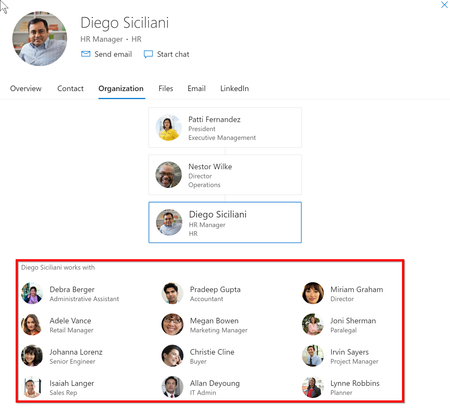
- Jul 24, 2019AFAIK, there is not currently a way to customize the people card in Office 365


Raymond_666
Feb 24, 2022Copper Contributor
Final update from me.
After about 50 hours, all initial test users in the group did not show any "works with".
Additional 5 test users was added and everything works as expected.
Perfect! Thanks.

NickiBorell
Feb 24, 2022MVP
It looks like you just have to wait long enough. 24h was definitely not enough, but now the setting is also working for me and "work-with" is no longer displayed for the users in the corresponding Azure AD group.
- JensKuenzlerMar 25, 2022Copper ContributorThank you Nicki, that worked for me! The Graph SDK cmdlet Get-MgOrganizationSettingPersonInsight worked as well.
- NickiBorellMar 25, 2022MVPWith these permissions it worked for me:
- Directory.AccessAsUser.All
- User.Read
- User.ReadBasic.All
- User.ReadWrite - JensKuenzlerMar 25, 2022Copper ContributorHi Nicki, I'm struggeling to set peopleInsights using Graph Explorer. Could you perhaps give me a hint which permissions are needed? I already tried User.ReadWrite.All","Organization.ReadWrite.All","Directory.ReadWrite.All" - but no luck. Thanks!
 PeterNjorogeMSMar 03, 2022
Microsoft
After investigation seems the issue is not the API, that works as it should, the cache is the issue, before it's refreshed it take time.