Forum Discussion

TheHailender
Jul 24, 2019Brass Contributor
Hide the 'works with' information on the Office 365 profile card
Hello, Is it possible to hide the works with Information in the organization-tab on the Office 365 https://support.office.com/en-us/article/Profile-cards-in-Office-365-e80f931f-5fc4-4a59-ba6e-c1e35a...
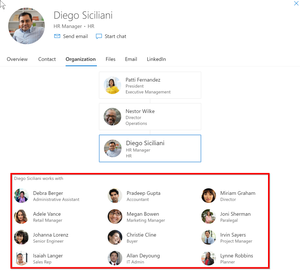
- Jul 24, 2019AFAIK, there is not currently a way to customize the people card in Office 365


Raymond_666
Feb 23, 2022Copper Contributor
Update.
3 of 5 users has "lost works with". (45 hours since enabling).
Side effect, we have organization chart (manager registered). Selecting a "disabled" user does not show coworkers. However, selecting an "enabled" coworker shows the disabled user. For us, this does not matter what so ever and we totally do not care. Being in an organization chart is not an unintentional disclosure of information.
3 of 5 users has "lost works with". (45 hours since enabling).
Side effect, we have organization chart (manager registered). Selecting a "disabled" user does not show coworkers. However, selecting an "enabled" coworker shows the disabled user. For us, this does not matter what so ever and we totally do not care. Being in an organization chart is not an unintentional disclosure of information.

PeterNjorogeMS Microsoft
Feb 24, 2022MicrosoftHi Raymond_666 , I have asked one of our devs to review this feedback and reach out to you and NickiBorell hopefully he can help resolve this.