Forum Discussion

Dennis Haxe
Nov 01, 2019Brass Contributor
Delete Business APPS for all users
Hi, When new users logs in they see a bunch of apps and I don't know where to disable them. Example: Thanks in advance.
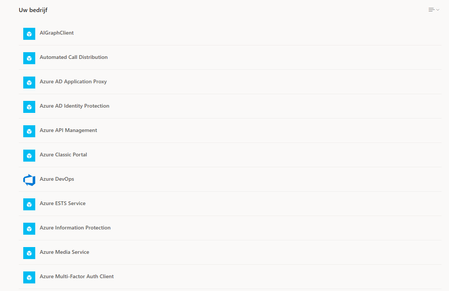
- Nov 01, 2019Hi Dennis Haxe,
Azure AD
https://aad.portal.azure.com/ > Enterprise Applications > All Applications
You can either remove them or you can switch off whether they are visible to users
Hope that answers your question!
Best, Chris

Nov 01, 2019
Not as far as I know. If you do it through the Azure Portal you have to do it one by one through the app properties (same place where you can make it invisible). I guess it may be possible through Powershell, but I have never specifically looked at or attempted that - and I probably would not advise it as you would look to evaluate if you are still using them, or if they are required moving forward. I would say there is a discovery exercise here first.
Best, Chris
Best, Chris

Dennis Haxe
Nov 01, 2019Brass Contributor
ChrisHoardMVP What I find strange is that all these Applications or shown to my end-users. When they click on it (and they will  ) they will receive an error message. This is not user friendly and I guess I will receive a bunch of questions about this.
Maybe we can hide these Microsoft Applications. I have another tenant with the same MIcrosoft applications and these are not shown to the users. Only the applications which we have created ourself.
- Nov 01, 2019You can hide the applications. Click on them and there is an option which says make these visible to users. Simply switch off and save :white_heavy_check_mark:
Best, Chris- Dennis HaxeNov 01, 2019Brass Contributor
ChrisHoardMVP I'm sorry Christopher but I cannot find it
 Could you provide me with a screenshot? Thanks!!
- Nov 01, 2019https://aad.portal.azure.com/ > Enterprise Applications > All Applications > Click into app > disable make visible
Best, Chris