Forum Discussion

BUG: Filtering to a view in the document library (preview) web part doesn't filter to that view
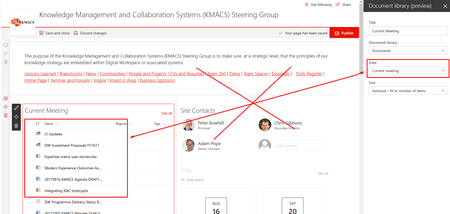

Are you still having issues with this? I've just tested in two of my tenancies and I see the web parts working exactly as Paul suggests. I've even tried using both modern List View web parts and Document Library view web parts, and both work as I would expect.
Steps during my testing:
1. Create view on the list / library and confirmed that they are filtering the data as expected
2. Put list/library web part on the home page
3. Edited properties, selected the view, and then clicked Apply
4. Checked that the correct view is being display - test passed
5. Published page
6. Checked that the correct view is still being displayed - test passed
 Sven SchmidbergerAug 09, 2018Copper Contributor
Matt Weston it works like you describe, but if I add a 7th step (browser refresh) I'm back to the default view. Also anybody else accessing it after the 'corrected' publish gets the default view.
 DeletedAug 09, 2018
Having the same issue and logged a ticket with Microsoft. They replied saying they have no update or ETA for a fix at this time.