Forum Discussion

BBaker90
Jan 18, 2022Copper Contributor
Xlookup
Good morning, I have a multi-sheet spreadsheet. I want the table on one sheet to autofill the sections on another sheet based off what is put into one cell. I can get vlookup to work on 2 specifi...
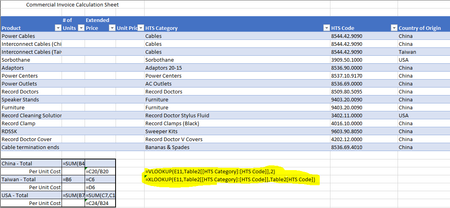
- Jan 18, 2022

SergeiBaklan
Jan 18, 2022Diamond Contributor

BBaker90
Jan 18, 2022Copper Contributor
It works! Thanks so much. I followed the instructions I found, which covered multiple columns in the lookup array so I would have never thought of that.
- SergeiBaklanJan 18, 2022Diamond Contributor
BBaker90 , you are welcome
 cyriljayaApr 09, 2022Copper Contributor
Good day to all,
I have table as below.
Employee Name 01-Apr-22 02-Apr-22 03-Apr-22 04-Apr-22 05-Apr-22 06-Apr-22 07-Apr-22 08-Apr-22 09-Apr-22 10-Apr-22 11-Apr-22 Peter V12 V13 V14 V15 V16 V17 V18 V19 V20 V21 V22 Steven h5 h6 h7 h8 h9 h10 h11 h12 h13 h14 h15 Smith h5 h6 h7 h8 h9 h10 h11 h12 FP1 FP2 FP3 Anne V33 V34 V35 h1 h2 h3 h4 h5 h6 h7 h8 Rodney V5 V6 V7 V8 V9 V10 V11 V12 V13 V14 V15 Simon h19 h20 h21 V1 V2 V3 V4 V5 V6 V7 V8 Above table represent those employees assigned location, First letter says which location and second letter says how many days in that location. I want to get list with two filtering option, First filter is Date from the first row such as 1st Apr, 2nd Apr etc... and second filter is department such as V, h, FP etc
Any one could help me to find solution, I tried with Xlookup, but it didn't return multiple results when several employees assigned to same department in same day. it returned only first employee name.
brg
Cyril
- SergeiBaklanApr 10, 2022Diamond Contributor
If filter by department based on first date column
it could be
=FILTER(
   FILTER( data, headers >=firstDate),
   LET(
     dateColumn, XLOOKUP( firstDate, headers, data ),
    ( dateColumn = firstDate ) +
    ( LEFT(dateColumn,  LEN(department) ) = department )
   )
)