Forum Discussion

Pharmalisk
Dec 05, 2024Copper Contributor
Xlookup using multiple criteria and itself
Hello, I am trying to automate a process of looking up values from two other sheets and I can't seem to get the last part down. I have the working sheet and I am looking to match the Line It...
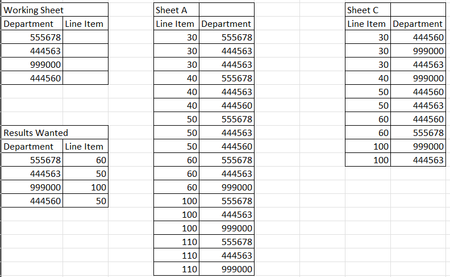
- Dec 05, 2024
In B2 on Working Sheet:
=LET(filterA, FILTER('Sheet A'!$A$2:$A$100, 'Sheet A'!$B$2:$B$100=A2, ""),
     filterB, FILTER('Sheet B'!$A$2:$A$100, 'Sheet B'!$B$2:$B$100=A2, ""),
     combined, FILTER(filterA, ISNUMBER(XMATCH(filterA, filterB)), ""),
     INDEX(combined, 1))

HansVogelaar
Dec 05, 2024MVP
In B2 on Working Sheet:
=LET(filterA, FILTER('Sheet A'!$A$2:$A$100, 'Sheet A'!$B$2:$B$100=A2, ""),
     filterB, FILTER('Sheet B'!$A$2:$A$100, 'Sheet B'!$B$2:$B$100=A2, ""),
     combined, FILTER(filterA, ISNUMBER(XMATCH(filterA, filterB)), ""),
     INDEX(combined, 1))

Pharmalisk
Dec 05, 2024Copper Contributor
Thank you, Hans!
I was going about it the wrong way and this way worked great. I added an additional filter to filterA to limit the line item column to 50 to 100 and it worked perfectly!.
Thank you again!