Forum Discussion

XLOOKUP search w/multiple output
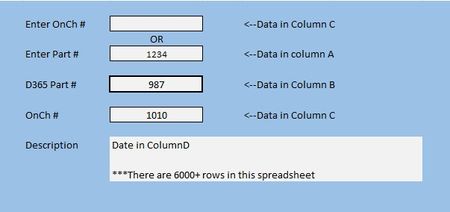
- Feb 27, 2026
A macro/VBA routine probably could be used to place data in the white fields. Formulas put data in the space with the formula. Just as yours does now. But once a formula has been written, it's good to go. I personally don't like to use (and don't) macros, preferring by far to write formulas.
Without knowing how this is going to be used over the longer term, I'd revise it slightly to make clear that data entry is only in the yellow background cells (a useful convention to adopt). Right now it's set up so you can enter things in either or both. You may run into problems from time to time as it appears that some of your numbers are entered as numbers, others as text. To be consistent, given the variety of formats of D365 numbers, you should keep them all as txt.


Much the same as NikolinoDE
=IF(ISTEXT(OnChNum), "("&OnChNum&")", XLOOKUP(part, oldNumber, OnChList))

=IF(
    ISTEXT(OnChNum),
    XLOOKUP(OnChNum, OnChList, description),
    XLOOKUP(part, oldNumber, description)
 )
The only other thing I would suggest is that if both the OnCh and part numbers are present you use conditional formatting to hide the part number.
The conditional format would test the OnCh entry but apply number formatting of the form "---" to the part number entry.
- NikolinoDEFeb 28, 2026Platinum Contributor
Hi Peter, you might consider taking another look at how ISTEXT() behaves within your formula.
ISTEXT() checks specifically whether a cell contains text — it doesn’t evaluate whether the cell contains a valid lookup value. If someone enters a numeric OnCh number (which yours appear to be), ISTEXT() will return FALSE, even though the entry itself is entirely valid.
For example, if OnChNum = 1010 (a number), ISTEXT(OnChNum) evaluates to FALSE. In that case, the formula would not continue with the lookup, even though a correct value has been provided.
It may therefore be helpful to base the condition on whether a value is present rather than whether it is text. This keeps your overall logic intact while making the behavior more flexible for different input types.
- PeterBartholomew1Mar 01, 2026Silver Contributor
True. I started with NOT(ISBLANK(...)) and was over-hasty with the refactoring!
- NikolinoDEMar 02, 2026Platinum Contributor
Here's a try for a single master formula that calculates the row once and feeds all three output fields – much cleaner for more than 6000 rows. I think this is correct, but I haven't tested it yet🙂.
=LET(
lookupValue, IF(OnChNum<>"", OnChNum, part),
lookupColumn, IF(OnChNum<>"", OnChList, oldNumber),
IF(lookupValue="","",
XLOOKUP(lookupValue, lookupColumn, B2:D10606, "")))
