Forum Discussion

XLOOKUP search w/multiple output
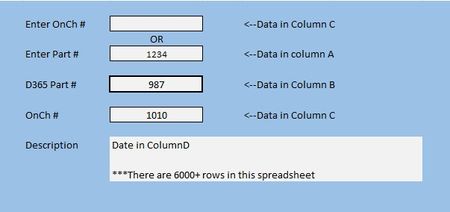
- Feb 27, 2026
A macro/VBA routine probably could be used to place data in the white fields. Formulas put data in the space with the formula. Just as yours does now. But once a formula has been written, it's good to go. I personally don't like to use (and don't) macros, preferring by far to write formulas.
Without knowing how this is going to be used over the longer term, I'd revise it slightly to make clear that data entry is only in the yellow background cells (a useful convention to adopt). Right now it's set up so you can enter things in either or both. You may run into problems from time to time as it appears that some of your numbers are entered as numbers, others as text. To be consistent, given the variety of formats of D365 numbers, you should keep them all as txt.

You put this query up three days ago, and have had zero responses. I am going to offer an explanation: your query doesn't make sense. Not fully. It's clear that you want to be able to enter one of two data items (at the top of that blue box) and have the rest of them filled in by Excel. That IS clear. What's not at all clear is where the formula //=XLOOKUP(H8,A2:A10606,B2:B10606) fits in all of it. What cell, for example, is H8? Is it one of the ones showing in the blue box area? And where in heaven's name do you have the formula itself in all of this?
Finally, instead of images, please post the actual file. From all appearances, it's dummy data already; if not, make it anonymous so that no proprietary information is revealed. If you can't post it here in the forum, use OneDrive or Google or the equivalent and paste a link here.