Forum Discussion

Why does this funcyion return zero wwhen the cell i empty.
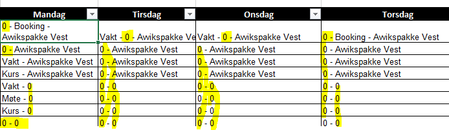

Patrick2788 opps, i translated the function name wrong from Norwegian. I use TextJoin 🙂 So TRUE is set to ignore blanks
- Geir

Are those cells really empty or are they maybe 0s formatted to display as blank? I'd check the value displayed in the formula bar.
One way to pull out the 0s in the joined string (Small example, change the ranges accordingly) :
=SUBSTITUTE(TEXTJOIN(" - ",TRUE,A1:C1),"0 -","")
- Hogstad_RaadgivningNov 06, 2019Iron Contributor
Hi Patrick2788 Good quetsion. They are dropdownlist, with a table range. I made the cells standard cells, also changed it to a Text cell. Same result.
Here with textjoin only: The function in English =Textjoin(" - ";TRUE;t_teamleder[Man48])
No blanks. So must be the IF?
I Will Try Substitute
I tried with FILTEER. Evalueting the FILTER formula, shows 0, but they does not display.
Function:
=TextJoin(" - ";TRUE;FILTER(t_teamleder[Tir48];t_teamleder[AnsattID]=[@AnsattID]);FILTER(t_montasje[Tir48];t_montasje[AnsattID]=[@AnsattID]))