Forum Discussion

Who can explain this to me?
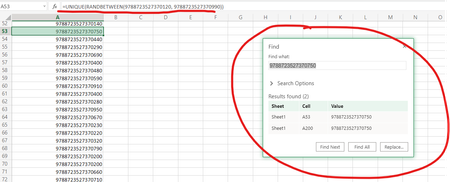
- Feb 09, 2022
Let's say you want 100 random numbers, but list only the unique values:
=UNIQUE(RANDARRAY(100,1,9788723527370120,9788723527370990,TRUE))
Warning: keep in mind that ALL numbers will end in 0 because your numbers have 16 digits but Excel only displays 15 significant digits. Why not generate random numbers between 120 and 990?


Let's say you want 100 random numbers, but list only the unique values:
=UNIQUE(RANDARRAY(100,1,9788723527370120,9788723527370990,TRUE))
Warning: keep in mind that ALL numbers will end in 0 because your numbers have 16 digits but Excel only displays 15 significant digits. Why not generate random numbers between 120 and 990?
- OhayonsonFeb 10, 2022Copper Contributor
I get a spill error when i paste
=UNIQUE(RANDARRAY(100,1,9788723527370120,9788723527370990,TRUE))
in a clean sheet at a1 cell.
Am i doing something wrong?
- SergeiBaklanFeb 10, 2022Diamond Contributor
That's floating error which could appear could not #SPILL! - Volatile Size (microsoft.com) Maybe considered as bug, but that's how dynamic arrays are designed.
- HansVogelaarFeb 10, 2022MVP
Thanks, Sergei!
- HansVogelaarFeb 10, 2022MVP
No, it appears to be a bug.
Paste the formula into any other cell - it should work.
After that it should work in A1 too.
- OhayonsonFeb 09, 2022Copper ContributorThe reason why i need this long number is because i need a nubmer which is similar to an isbn nr. with the prefix 9788723527370 but i cam make it shorter so the prefix is 978872352737.
Thank you very much for your time and answer.
