Forum Discussion

Who can explain this to me?
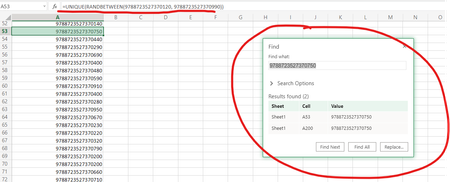
- Feb 09, 2022
Let's say you want 100 random numbers, but list only the unique values:
=UNIQUE(RANDARRAY(100,1,9788723527370120,9788723527370990,TRUE))
Warning: keep in mind that ALL numbers will end in 0 because your numbers have 16 digits but Excel only displays 15 significant digits. Why not generate random numbers between 120 and 990?


- HansVogelaarFeb 09, 2022MVP
Let's say you want 100 random numbers, but list only the unique values:
=UNIQUE(RANDARRAY(100,1,9788723527370120,9788723527370990,TRUE))
Warning: keep in mind that ALL numbers will end in 0 because your numbers have 16 digits but Excel only displays 15 significant digits. Why not generate random numbers between 120 and 990?
- OhayonsonFeb 10, 2022Copper Contributor
I get a spill error when i paste
=UNIQUE(RANDARRAY(100,1,9788723527370120,9788723527370990,TRUE))
in a clean sheet at a1 cell.
Am i doing something wrong?
- SergeiBaklanFeb 10, 2022Diamond Contributor
That's floating error which could appear could not #SPILL! - Volatile Size (microsoft.com) Maybe considered as bug, but that's how dynamic arrays are designed.
- OhayonsonFeb 09, 2022Copper ContributorThe reason why i need this long number is because i need a nubmer which is similar to an isbn nr. with the prefix 9788723527370 but i cam make it shorter so the prefix is 978872352737.
Thank you very much for your time and answer.

