Forum Discussion

Which formula can use for identify the number and ignore the text

 Sep 06, 2019
Hello,
Good Morning !!!! : )
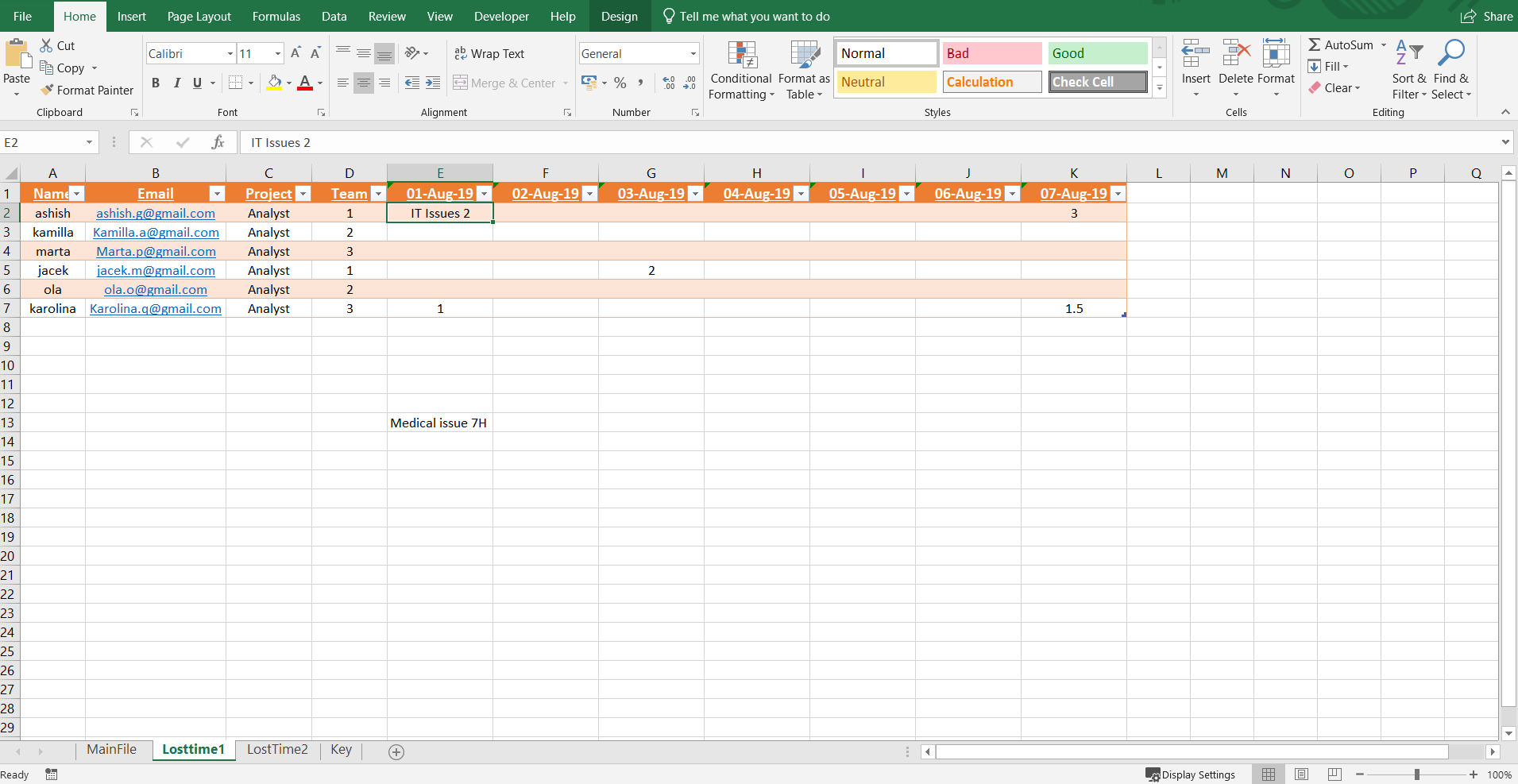
1) Formula is working fine (See the below images Sheet1,2,3). If you can see the below images that sheet3 have value "0" then this formulas is work but if in same shell (Sheet3) not data (Blank) ( Sheet11,12,13 ) than this formulas is not working. Same with Sheet2 shell.
It should work like that, If sheet2 have data and sheet3 no data (Blank) then sheet1 do calculation (8-Sheet2 shell) but if sheet2 have no data as well sheet3 no data then sheet1 should print only " A ".
Formula :
=IF(Table19[@[01-Aug-19]]="Bank Holiday","Bank Holiday",IF(Table19[@[01-Aug-19]]="Holiday","Holiday",IF(Table19[@[01-Aug-19]]="Unpaid Leave","Unpaid Leave",IF(AND(IF(ISNUMBER(Table19[@[01-Aug-19]]),Table19[@[01-Aug-19]],TRIM(RIGHT(SUBSTITUTE(Table19[@[01-Aug-19]]," ",REPT(" ",LEN(Table19[@[01-Aug-19]]))),LEN(Table19[@[01-Aug-19]]))))>=0,IF(ISNUMBER(Table110[@[01-Aug-19]]),Table110[@[01-Aug-19]],TRIM(RIGHT(SUBSTITUTE(Table110[@[01-Aug-19]]," ",REPT(" ",LEN(Table110[@[01-Aug-19]]))),LEN(Table110[@[01-Aug-19]]))))>=0),"A ( "&8-IF(ISNUMBER(Table19[@[01-Aug-19]]),Table19[@[01-Aug-19]],TRIM(RIGHT(SUBSTITUTE(Table19[@[01-Aug-19]]," ",REPT(" ",LEN(Table19[@[01-Aug-19]]))),LEN(Table19[@[01-Aug-19]]))))-IF(ISNUMBER(Table110[@[01-Aug-19]]),Table110[@[01-Aug-19]],TRIM(RIGHT(SUBSTITUTE(Table110[@[01-Aug-19]]," ",REPT(" ",LEN(Table110[@[01-Aug-19]]))),LEN(Table110[@[01-Aug-19]]))))&"H )","A"))))
Please if you can help me.
Thank you in advance.
Hello,
Yes, you are right. as i said am only interested to identify only number (Which is sheet2 " IT Issues 2 ") and minus with other sheet shell (Minus alway with 8).
Now please not that, In sheet1 shell if sheet2 shell have no value then print as " A " then calculate " 8 - 2" and print " A (6) ".
I hope now you will understand and help me for it.
Thank you.

Or maybe this, replacing the condition also...
=IF(IF(ISNUMBER(Table19[@[01-Aug-19]]),Table19[@[01-Aug-19]],TRIM(RIGHT(SUBSTITUTE(Table19[@[01-Aug-19]]," ",REPT(" ",LEN(Table19[@[01-Aug-19]]))),LEN(Table19[@[01-Aug-19]]))))>0,"A ("&8-IF(ISNUMBER(Table19[@[01-Aug-19]]),Table19[@[01-Aug-19]],TRIM(RIGHT(SUBSTITUTE(Table19[@[01-Aug-19]]," ",REPT(" ",LEN(Table19[@[01-Aug-19]]))),LEN(Table19[@[01-Aug-19]]))))-IF(ISNUMBER(Table110[@[01-Aug-19]]),Table110[@[01-Aug-19]],TRIM(RIGHT(SUBSTITUTE(Table110[@[01-Aug-19]]," ",REPT(" ",LEN(Table110[@[01-Aug-19]]))),LEN(Table110[@[01-Aug-19]]))))&")","A")Btw how the data gets populated in those tables? Are these manual entries or imported from an external source? If those are the manual entries, you may put a validation rule so that the table only accepts a numeric input in those table columns.
- ashishG1984Sep 02, 2019Copper Contributor
Hello Subodh,
If i put data in sheet2 shell manually then your first formula is worked. But i have already plan to put there data validation by list (On sheet2 shell) (please see attachment).
So now how can i do that ?
