Forum Discussion

Which feature should I use for a sum of taxes collected for each city by name?
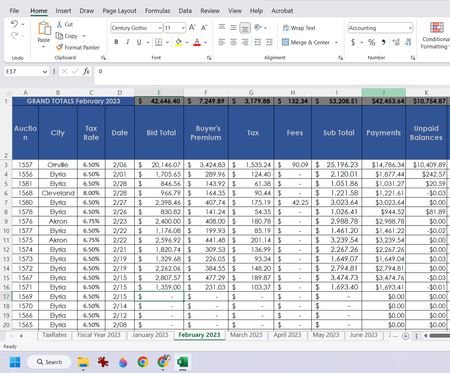

In B30:
=SUMIF($B$2:$B$26, A30, $G$2:$G$26)
Fill down.
Alternatively, create a pivot table based on the data, and add the City field to the Rows area and the Tax field to the Values area.

- HansVogelaarMar 13, 2023MVP
A pivot table based on the data range in your first screenshot will automatically list only the cities that are present in that range.
- johnsboxftmMar 13, 2023Brass Contributor
I apologize, but I am not comprehending.
If I could pull from this list:
Any of these cities that appear in this column:
Have each city by name appear in A30 and so on (where if there are 11 Clevelands it just says Cleveland) and in Box B30 be the total for those Clevelands taken from G3 and down
- HansVogelaarMar 13, 2023MVP
Select B2:H26 on the February 2023 sheet.
On the Insert tab of the ribbon, click PivotTable.
Select 'Existing Worksheet'.
Click in the Location box.
Click in cell A29, then click OK.
Excel should display the PivotTable Fields task pane.
Drag City to the Rows area.
Drag Tax to the Values area.