Forum Discussion

When using IF formula how to return blank cell if error
 Feb 22, 2023
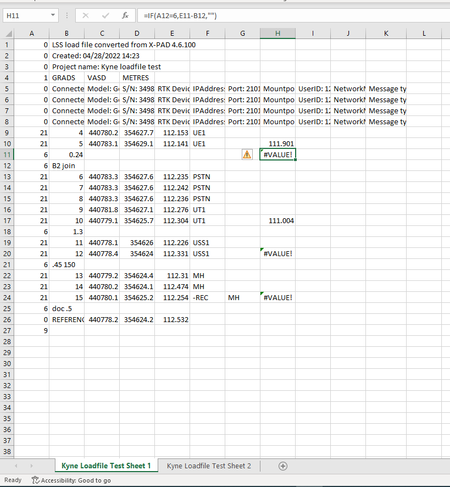
=IFERROR(IF(A12=6,E11-B12,""),"")This is the formula in sheet 1 which returns an empty cell in case of an error in my worksheet.
=IF(ISERROR(IF('Kyne Loadfile Test 1'!A12=6,'Kyne Loadfile Test 1'!E11-'Kyne Loadfile Test 1'!B12,"")),'Kyne Loadfile Test 1'!E11,'Kyne Loadfile Test 1'!H11)This formula returns the value from cell E11 of sheet 1 if there is an error in the calculation E11-B12.
Kyne Loadfile Test 1:
Kyne Loadfile Test 2:
.

Firstly, thankyou for the response. This has solved the first issue however it hasn't resolved the second one. This has displayed all the original levels which were subject to error previously however it is not showing any of the previous levels which did not need any subtraction from them. Would it be possible to incorporate this into the formula as every time we were to use this excel document, the layout of which levels would need subtraction would be different.
I have shown the formula used on both sheet 2 and sheet 1. Thankyou in advance.
You are welcome. I'm not sure what the expected results are. I've set up an Excel file with parts of your data. Can you share the expected results in cells E11, E12 and so on?
Sheet "Kyne Loadfile Test 2":
- KyneStaley1Feb 23, 2023Copper Contributor
If the E column on Sheet 1 does not have a value in its row on column H then the value of the E column should carry over to sheet 2. For example:
E9 on sheet 1 would go to E9 sheet 2 as there's no value in column H.
E10 on sheet 2 would mirror H10 on sheet 1 as this number has been amended.
E11 on both sheets would remain blank and not show any data.
E12 on both sheets would remain blank and not show any data.
E13 on sheet 1 would go to E9 sheet 2 as there's no value in column H.
E20 on sheet 2 would be the same as sheet 1 as there are two numbers so no sum has taken place.
Thankyou for your help!
- OliverScheurichFeb 23, 2023Gold Contributor
=IF(AND('Kyne Loadfile Test 1'!H9="",'Kyne Loadfile Test 1'!E9=""),"",IF('Kyne Loadfile Test 1'!H9="",'Kyne Loadfile Test 1'!E9,'Kyne Loadfile Test 1'!H9))This is the formula in cell E9 of sheet "Kyne Loadfile Test 2" which returns the expected results in the attached file.
- KyneStaley1Feb 23, 2023Copper ContributorThat's worked.
Thankyou so much for you help!