Forum Discussion

saemi95
Oct 11, 2021Copper Contributor
When the numeric value to SUM is in column X and the list to detect UNIQUE is column Y
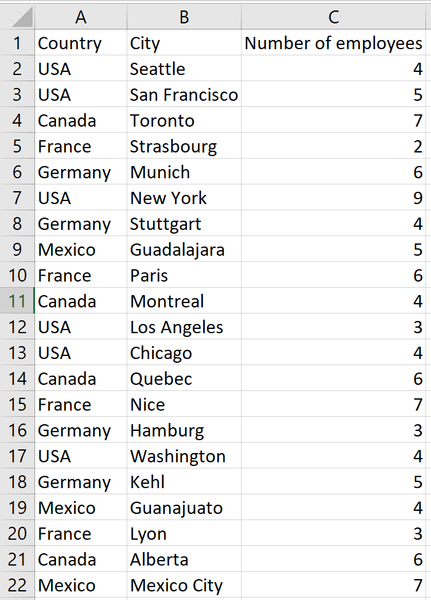
Hello, I have a dataset that is essentially this. What I need to do is to count the total number of employees by Country (not City). I'm having a hard time finding the correct formula for this....
- Oct 11, 2021
See the attached version. I used a helper column, and I added two solutions: one formula-based and the other a pivot table.

saemi95
Oct 11, 2021Copper Contributor
Yes, you are right to be confused haha. I just realized I didn't specify that the values from column B are repeated.
This dataset is a simplified version of my real dataset, and I have more fields in further columns, but for simplicity, we can assume that the values from column B are repeated (having always the same value on C per row) but I need to sum that value only one time.
I hope this clarifies it more
This dataset is a simplified version of my real dataset, and I have more fields in further columns, but for simplicity, we can assume that the values from column B are repeated (having always the same value on C per row) but I need to sum that value only one time.
I hope this clarifies it more

HansVogelaar
Oct 11, 2021MVP
See the attached version. I used a helper column, and I added two solutions: one formula-based and the other a pivot table.
- saemi95Oct 11, 2021Copper ContributorThanks!
This solves it definitely!
How could I calculate everything in one cell?
This would create repeated calculated values, I know but with the no-simplified version this makes sense.- HansVogelaarOct 11, 2021MVP
Here is a solution without a helper column.