Forum Discussion

saemi95
Oct 11, 2021Copper Contributor
When the numeric value to SUM is in column X and the list to detect UNIQUE is column Y
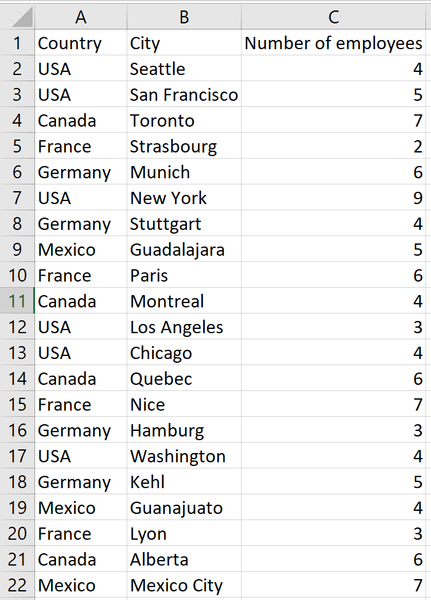
Hello, I have a dataset that is essentially this. What I need to do is to count the total number of employees by Country (not City). I'm having a hard time finding the correct formula for this....
- Oct 11, 2021
See the attached version. I used a helper column, and I added two solutions: one formula-based and the other a pivot table.

HansVogelaar
Oct 11, 2021MVP
I'm confused.
You write "count the total number of employees by Country (not City)". If that is correct, it does not matter whether there are cities with the same name in different countries.

saemi95
Oct 11, 2021Copper Contributor
Yes, you are right to be confused haha. I just realized I didn't specify that the values from column B are repeated.
This dataset is a simplified version of my real dataset, and I have more fields in further columns, but for simplicity, we can assume that the values from column B are repeated (having always the same value on C per row) but I need to sum that value only one time.
I hope this clarifies it more
This dataset is a simplified version of my real dataset, and I have more fields in further columns, but for simplicity, we can assume that the values from column B are repeated (having always the same value on C per row) but I need to sum that value only one time.
I hope this clarifies it more
- HansVogelaarOct 11, 2021MVP
See the attached version. I used a helper column, and I added two solutions: one formula-based and the other a pivot table.
- saemi95Oct 11, 2021Copper ContributorThanks!
This solves it definitely!
How could I calculate everything in one cell?
This would create repeated calculated values, I know but with the no-simplified version this makes sense.- HansVogelaarOct 11, 2021MVP
Here is a solution without a helper column.